

Risk-Managed Commerce Migration
Shopify Migration Services
A replatform carries real risk: lost rankings, incomplete catalogs, a checkout that breaks on launch day. We migrate stores onto Shopify and Shopify Plus from Magento, WooCommerce, BigCommerce, and custom platforms with a reconciled data move, preserved SEO, and a rehearsed cutover, not a rushed weekend.
- Full catalog, customer, and order data migration
- SEO-safe redirects and preserved rankings
- Rehearsed, monitored cutover with a rollback plan
Migration Overview
A migration is a rebuild, planned around your live store
Moving to Shopify means re-creating your catalog, customers, and order history on a different architecture, not copying files across. The store keeps selling while that happens, and that constraint shapes the whole approach.
What is Shopify migration?
Shopify migration is the structured move of an online store from Magento, WooCommerce, BigCommerce, another Shopify plan, or a custom platform onto Shopify or Shopify Plus. It covers product, customer, and order data transfer, theme and app re-implementation, SEO and URL preservation through redirects, and a rehearsed cutover, rather than a direct copy of the old store's files onto new infrastructure.
Catalog structure, checkout logic, and app dependencies rarely map one to one between platforms. A useful migration plan accounts for where they differ before development starts, not after data has already moved.
Migration is also a natural point to fix what the old platform made difficult. See our Shopify development page for the platform work that often follows a migration, theme customization, app builds, and ongoing iteration.
Why Businesses Migrate
Common reasons stores move to Shopify
A migration is usually triggered by a specific, recognizable pain point rather than a vague desire for something new.
Rising Platform Costs
Licensing, hosting, and agency overhead on the current platform have outgrown what the store actually needs.
Accumulated Technical Debt
Years of customization have made the current build fragile, slow to change, and risky to touch.
Slow Storefront Performance
Page speed and Core Web Vitals lag behind what the current platform's architecture can reasonably deliver.
Heavy Maintenance Burden
Security patching, extension conflicts, and version upgrades consume time that should go toward growth.
Checkout Limitations
The current platform cannot support the payment methods, promotions, or checkout UX customers now expect.
B2B and Wholesale Needs
Company accounts, tiered pricing, and bulk ordering are outgrowing what the current setup supports.
Agency Dependency
Every change requires specialist developers, slowing down teams that want more day-to-day control.
Scaling Constraints
Traffic, catalog size, or order volume are approaching limits the current architecture was not built for.
Supported Migration Paths
Move to Shopify from any of these platforms
The source platform changes what needs mapping, but the underlying discipline, audit, reconcile, rehearse, stays the same.
Magento or Adobe Commerce
Move complex catalogs, custom modules, and B2B logic off Magento onto Shopify or Shopify Plus. If staying on Magento is still on the table, our Magento consulting services can help weigh that decision first.
WooCommerce
Move away from plugin-dependent WordPress commerce onto a fully hosted, managed Shopify environment.
BigCommerce
Reconcile catalog, customer, and order data onto Shopify while preserving the SEO equity already built.
Custom or Legacy Platforms
Move off a bespoke or end-of-life platform onto Shopify's supported, actively maintained infrastructure.
Shopify to Shopify Plus
Upgrade an existing Shopify store into Plus for native B2B, higher API limits, and multiple expansion stores.
Other Platforms
Other source platforms are assessed case by case during the migration audit, based on what data and logic actually need to move.
Choosing The Destination
Shopify or Shopify Plus?
The right plan depends on catalog complexity, B2B requirements, and growth plans, not a default assumption.
For growing direct-to-consumer stores
A strong fit for most catalogs moving off a legacy platform: fully hosted, secure by default, and backed by a large app ecosystem that covers much of what used to require custom code.
- Direct-to-consumer catalogs without complex B2B needs
- Standard checkout and the existing app ecosystem cover requirements
- Fastest, lowest-overhead path off a legacy platform
For B2B, wholesale, and high-volume stores
The right destination when a business needs native B2B functionality, checkout customization, higher API limits, or several expansion stores under one organization.
- Company accounts, tiered pricing, and wholesale ordering
- Checkout customization through Shopify Functions and scripts
- Higher API limits and multiple linked storefronts
Not sure which plan fits? A migration audit maps the right destination before any data moves. Book a Free Consultation →
What A Migration Covers
Six areas every Shopify migration addresses
Every project is scoped to the store's own data and complexity, not a fixed package. These are the areas that scope is built from.
Core Data
Data Migration & Reconciliation
Products, customers, and orders move first, and get checked against the source platform before anything else is built on top of them.
- Products, variants, collections, and media
- Metafields and custom product attributes
- Customer accounts and full order history
- CMS pages and blog content
- Post-transfer reconciliation against the source platform
Storefront
Theme & Storefront Rebuild
A migration is a natural point to leave a dated storefront behind rather than recreate its limitations on new infrastructure.
- Modern, conversion-aware theme selection or custom build
- Category, product, and collection page structure
- Mobile-first responsive layout
- Design-to-development handoff for custom sections
Need deeper storefront design work? Explore Shopify Development →
Connected Systems
App & Integration Migration
Payment gateways, shipping carriers, email platforms, and ERP or CRM systems need to be reconnected, not just reinstalled.
- Payment gateway and tax configuration
- Shipping carrier and fulfillment reconnection
- Email and marketing platform sync
- ERP, CRM, or PIM reconnection where required
- Custom app development where no ready-made option exists
Organic Visibility
SEO & URL Preservation
Redirects are the minimum, not the whole plan. Rankings should hold through the move and have room to improve once the new store is live.
- Full URL mapping with 301 redirects
- Canonical tags and metadata preservation
- Structured data migration
- Post-launch indexing and ranking monitoring
Want SEO work that goes beyond the migration itself? Ethnic Infotech's technical SEO approach, built for Magento, follows the same redirect and structured-data discipline applied here for Shopify.
Wholesale Commerce
B2B & Wholesale Re-Implementation
Company accounts and tiered pricing rarely survive a direct lift-and-shift. On Shopify Plus, they get rebuilt natively rather than bolted on through apps alone.
- Company accounts and role-based buyers
- Tiered and customer-specific pricing
- Quote and approval workflows where required
- Checkout customization through Shopify Functions
Coming from a Magento B2B setup? Our Magento B2B Solutions page shows the kind of account and pricing logic this migration path re-implements on Shopify Plus.
Go-Live
Testing & Rehearsed Cutover
The new store runs in parallel with the old one, gets tested under realistic conditions, and only goes live through a planned, monitored cutover with a rollback path.
- Parallel environment for final testing
- Checkout and payment testing under load
- Documented rollback plan before go-live
- Monitored launch window with immediate verification
Migration Process
A clear path from audit to a rehearsed launch
The same five stages apply regardless of the source platform.
Audit
Inventory the current store: catalog, customizations, integrations, and the URLs driving traffic.
Output: Migration scopePlan
A phased roadmap with a redirect map, data plan, and destination decision (Shopify or Plus).
Output: Migration roadmapBuild & Migrate
Rebuild the storefront, transfer and reconcile data, and reconnect integrations.
Output: Parallel environmentTest & Rehearse
Test every path under realistic conditions and rehearse the cutover itself.
Output: Go-live readinessLaunch & Support
Monitored cutover, immediate verification, and a documented rollback path if needed.
Output: Live store, monitoredEngagement Models
Ways to scope a Shopify migration
Scope, timeline, and cost are agreed around the actual store and data involved, not a fixed package. No invented prices are shown here.
Migration Assessment
Audit the current store and produce a scoped migration plan before committing to the full project.
Fixed-Scope Migration
A defined source-to-target move with agreed data scope, timeline, and go-live plan.
Phased Migration Program
Sequence a larger catalog, complex integrations, or B2B re-implementation across controlled stages.
Migration Plus Support
Migration paired with ongoing post-launch monitoring, fixes, and iteration.
Selected Work
Real Shopify projects delivered by Ethnic Infotech
These two projects are genuine, published Shopify builds. Neither is tagged specifically as a platform migration in its case study, so they are presented here as real proof of Shopify delivery work rather than migration-specific results. No outcomes or figures beyond what is in the published case study are used.

Zolamod
A Shopify storefront built to showcase modular gaming furniture with premium product storytelling and a more flexible buying journey for tabletop gamers.
View Case Study →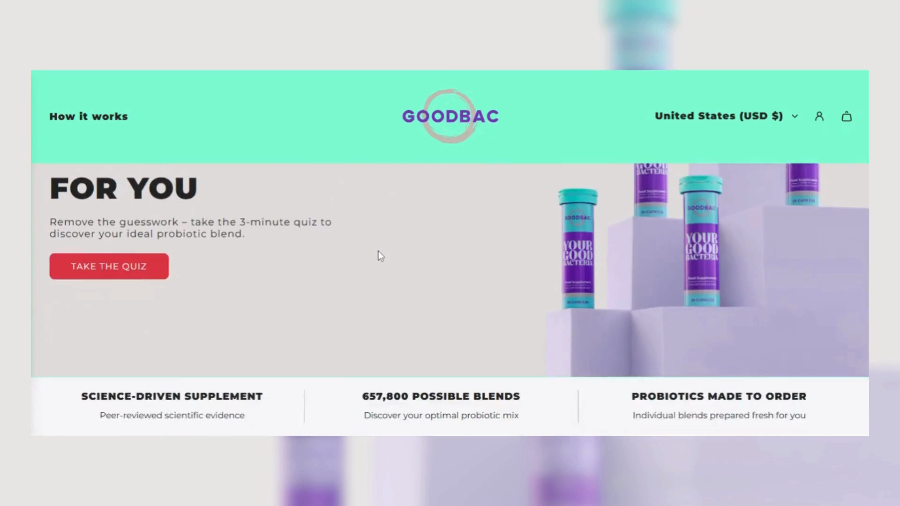
GoodBac
A Shopify experience for a personalized probiotic brand, built around a custom quiz that helps customers find the right blend for their needs.
View Case Study →Why Ethnic?
A migration treated as a rebuild, not a shortcut
We connect data integrity, SEO continuity, app reconnection, and a rehearsed cutover into one accountable process.
- Structured, reconciled data migration, not a raw import
- SEO and URL preservation built into the plan from day one
- Honest guidance on Shopify versus Shopify Plus
- Rehearsed cutover with a documented rollback plan
- B2B and wholesale re-implementation, not a workaround
- Post-launch support available once the store is live
Related Services
Connect migration with the wider Shopify roadmap
Use migration findings to plan the storefront, architecture, or support work that follows.
Frequently Asked Questions
Shopify migration FAQs
Direct answers about data, SEO, downtime, platform choice, and scope.
Will a Shopify migration hurt my search rankings?
Not when it is planned properly. We map every existing URL to its new destination with 301 redirects, preserve metadata and canonical tags, and migrate structured data so organic traffic holds steady through the move.
Which platforms can you migrate to Shopify from?
We migrate stores onto Shopify and Shopify Plus from Magento, Adobe Commerce, WooCommerce, BigCommerce, and custom or legacy platforms. The approach stays the same regardless of source: audit, map data and URLs, rebuild, run in parallel, then cut over.
What data actually carries over in a migration?
Products, variants, collections, and media; metafields; customer accounts and full order history; CMS and blog content; and your URL and redirect structure. Integrations and, on Shopify Plus, B2B catalogs and pricing are reconnected or re-implemented as part of the same project.
Should we migrate to Shopify or Shopify Plus?
Standard Shopify suits most growing direct-to-consumer stores. Shopify Plus is the right destination when you need native B2B, wholesale pricing, checkout customization, or higher API limits. We help decide during the migration audit, before any data moves.
How do you avoid downtime during the cutover?
The new Shopify store is built and tested in parallel with the existing one, and the cutover itself is rehearsed beforehand. The actual switch is a planned, monitored event with a rollback plan in place.
Can you migrate our custom features or apps?
Where a direct Shopify equivalent exists, we reconnect it. Where it does not, we can build a custom app or use Shopify Functions to close the gap, scoped during the migration audit.
How long does a Shopify migration take?
Timeline depends on catalog size, source platform, integration count, and whether B2B re-implementation is involved. A realistic timeline is set after the audit, not before it.
Do you provide support after the migration goes live?
Yes. Post-launch support can cover monitoring, incident fixes, and planned iteration once the store is live, available as an ongoing engagement rather than ending at cutover.
Plan Your Migration
Move to Shopify without losing what you built
Tell us where your store runs today and where it needs to go. We will scope a real migration plan around your catalog, data, and timeline.