

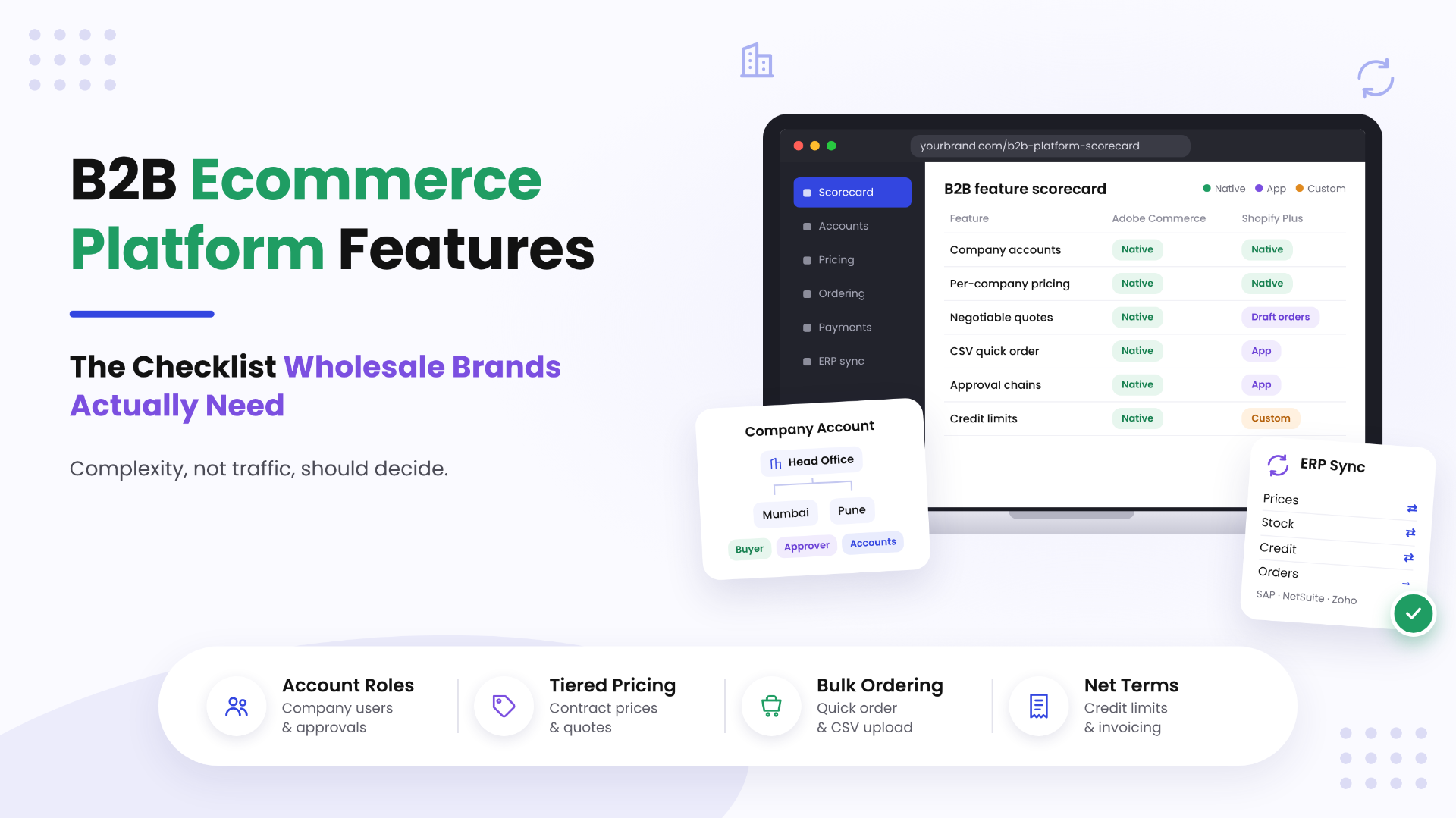
A B2B ecommerce platform needs to handle account hierarchies, negotiated and tiered pricing, quote-to-order workflows, and net-terms invoicing, and most D2C-first platforms bolt these features on instead of building for them. When a brand picks a platform without checking these first, it often ends up rebuilding pricing, approvals, and ERP sync around the platform later, which is the costly part. This checklist covers the B2B ecommerce platform features that matter, mapped to Magento (Adobe Commerce) B2B, Shopify Plus B2B, and headless approaches.
Quick answer for busy readers:
if your buyers belong to companies with several users, approval chains, and contract prices that live in an ERP, Adobe Commerce B2B covers more of that natively. If your wholesale model is a few price tiers, net terms, and fast reorders, Shopify’s B2B features cover it. Shopify’s Changelog confirms that since April 2, 2026, merchants on the Basic, Grow, and Advanced plans can sell wholesale with native B2B features at no additional cost. Operational complexity, not traffic, should decide.
Why B2B Ecommerce Needs Are Different From D2C
A D2C checkout serves one person spending their own money. A B2B order usually involves a company, several people with different permissions, a price someone negotiated months ago, and an invoice that finance pays 30 or 60 days later. That gap is why B2B ecommerce requirements look so different on paper.
Buyers have also moved online for real money. McKinsey’s 2024 B2B Pulse Survey, which polled 3,942 B2B decision makers across 13 countries, found that 71% of B2B companies offer some form of ecommerce and that online sales account for 34% of their revenue. A Gartner survey of 645 B2B buyers, run in August and September 2025 and reported in May 2026, found that 67% prefer a sales rep-free experience and 70% prefer a completely digital, self-service buying experience.
Put those together and the stakes are clear. Your wholesale ecommerce platform is no longer a nice extra next to the sales team. For a lot of accounts it is the sales channel, so it has to respect every commercial rule your reps used to handle by email.
Here is what usually breaks first when a D2C platform meets B2B reality:
- One login per company, when the customer actually has a buyer, an approver, and someone in accounts.
- One price per product, when every account has its own contract.
- Card-only checkout, when buyers expect to order on account and pay later.
- Product pages built for browsing, when a repeat buyer just wants to paste 40 SKUs and go.
The Core Feature Checklist
Use this as a scoring sheet. For each item, mark whether your current or shortlisted platform handles it natively, needs an app, or needs custom development. The pattern that emerges tells you more than any feature brochure.
Account hierarchies and buyer roles
What to look for: company accounts with multiple users, roles and permissions per user, and support for parent and child organizations (head office plus branches).
How Adobe Commerce handles it:Adobe describes the company account as the central B2B entity that every other feature depends on. Company administrators define their own structure and roles, and since B2B version 1.5.0 merchants can manage companies as hierarchical organizations by assigning companies to parent companies. One honest caveat from Adobe’s own implementation guidance: company hierarchies do not automatically pass shared catalog assignments, pricing, or credit limits down to child companies, so plan that mapping deliberately.
How Shopify handles it:Shopify B2B organizes buyers into companies and company locations, each with its own payment terms, shipping address, catalogs, tax exemptions, and checkout settings. Location-level permissions exist, but Shopify’s plan comparison lists them as admin and ordering only, so deep multi-step role structures usually need apps or custom work.
Our take: if your customers are large organizations with purchasing departments, this is the feature most likely to push you toward Adobe Commerce.
Custom/tiered pricing and quoting
What to look for: account-specific catalogs, contract prices, volume (tiered) price breaks, minimum and increment quantity rules, and a real quote workflow where buyer and seller can negotiate.
How Adobe Commerce handles it: shared catalogs control which products and prices each company sees, with custom pricing configured per company. Negotiable quotes let buyers request a quote from the cart, and sales reps can also create quotes on a buyer’s behalf, with the full back-and-forth kept in history. Adobe’s guidance notes that shared catalog custom pricing is limited to simple fixed prices per SKU, so complex formula pricing often comes from the ERP.
How Shopify handles it: B2B catalogs let you include or exclude products, apply percentage adjustments, or set fixed prices. You can add quantity rules (minimum, maximum, increment) and volume pricing, and quantity price breaks are available on every B2B plan. On the Basic, Grow, and Advanced plans you get up to 3 active catalog assignments across B2B markets. Unlimited catalogs for customer-specific pricing and direct catalog assignment to companies and locations remain exclusive to Plus, according to Shopify’s plan comparison. Quoting runs through draft orders: you can require B2B checkouts to be submitted as drafts for review, lock prices, and reserve inventory.
Our take: per-company price lists are the single biggest reason wholesale brands choose Shopify Plus B2B over the lower Shopify plans. True negotiated quoting remains stronger natively on Adobe Commerce.
Bulk ordering and reordering (CSV upload, quick order)
What to look for: order by SKU, CSV upload, saved lists for repeat orders, and one-click reorder.
How Adobe Commerce handles it:Quick Order lets customers place orders by SKU or product name, and the Order by SKU feature accepts a CSV with SKU and quantity columns. Requisition lists let buyers save standard order sets from their account dashboard. Adobe’s newer storefront also ships Quick Order and Requisition List as B2B drop-in components.
How Shopify handles it: Shopify lists a quick order list, easy reorders from customer accounts, and PO numbers on all B2B plans, plus the Trade theme built for B2B stores. CSV-based ordering by buyers typically comes from an app or a custom build.
Our take: both platforms cover the basics. Test with your heaviest real buyer, not a demo account.
Net-terms, invoicing, and credit limits
What to look for: payment terms per account, invoicing, a credit limit that blocks or flags orders, deposits, and approval rules before an order is placed.
How Adobe Commerce handles it: Payment on Account lets companies purchase up to their credit limit, and company admins see outstanding balance, available credit, and credit limit in their dashboard. Merchants can decide whether a company may exceed its limit. Purchase orders with approval rules let companies require sign-off based on order total and other conditions, and when several rules apply, every required approver has to approve.
How Shopify handles it: payment terms of Net 7, 15, 30, 45, 60, 90, or due on fulfillment are available, along with vaulted credit cards, payment reminders through Shopify Flow, and ACH in the US. Deposits, partial payments, and payment requests per fulfillment are Shopify Plus only. Shopify’s B2B documentation does not describe a native per-company credit limit, so credit control usually lives in your ERP, an app, or a custom function.
Our take: if finance needs the storefront to enforce credit limits, Adobe Commerce does it out of the box. On Shopify, budget for that logic.
ERP/CRM sync (SAP, Zoho, NetSuite)
This is where most B2B projects succeed or stall. Your ERP usually owns prices, stock, customer credit, and invoices, so the storefront has to read from it and write orders back without drift.
- Adobe Commerce: Adobe publishes implementation guidance for integrating Adobe Commerce with SAP ERP, including mapping each SAP customer number to a company account, shared catalog, and pricing source before configuration. On Adobe Commerce as a Cloud Service, integrations run through App Builder, webhooks, events, and API Mesh rather than core code changes.
- Shopify: Oracle’s NetSuite Connector page lists connectors for Shopify B2C and B2B, and Microsoft’s Shopify Connector for Dynamics 365 Business Central supports two-way sync of customers and companies plus pricing for catalogs linked to B2B companies. SAP and many other ERPs usually connect through middleware or custom APIs.
- Zoho: Zoho CRM exposes REST APIs secured with OAuth, so storefront to Zoho sync is normally a custom or connector-based build on either platform.
One detail worth knowing: Oracle’s NetSuite Connector page lists only Adobe Commerce B2C, so a NetSuite plus Adobe Commerce B2B setup typically needs custom or third-party integration work.
Platform Comparison for B2B: Adobe Commerce vs Shopify Plus B2B
This table reflects official Adobe Experience League and Shopify Help Center documentation as of November 2026. Features change, so confirm against current docs before you sign anything. For pricing and licensing, see our deeper guide on Shopify Plus vs Adobe Commerce.
| Feature | Adobe Commerce (with B2B) | Shopify Plus B2B |
|---|---|---|
| Company accounts | Native, with multiple users, roles, and permissions | Native companies and company locations |
| Account hierarchy | Parent and child companies (B2B 1.5.0+); pricing and credit not inherited automatically | Company with multiple locations; location-level permissions are admin and ordering only |
| Custom catalogs and pricing | Shared catalogs with per-company custom pricing (fixed price per SKU) | Unlimited catalogs, assignable directly to companies and locations |
| Tiered / volume pricing | Tier prices plus shared catalog pricing | Quantity price breaks per catalog |
| Quantity rules | Configurable per product | Minimum, maximum, and increment per variant |
| Quotes | Native negotiable quotes with negotiation history | Draft orders, checkout to draft, price locking |
| Quick order / CSV | Quick Order and Order by SKU with CSV upload | Quick order list; CSV ordering via apps |
| Saved lists and reorders | Requisition lists | Easy reorders from customer accounts |
| Net terms | Payment on Account | Net 7 to Net 90 or due on fulfillment |
| Credit limits | Native per-company credit limit | Not documented natively; ERP, app, or custom |
| Purchase order approvals | Native approval rules by order total and other conditions | Draft review; complex approval chains need apps or custom work |
| Deposits / partial payments | Custom or extension | Native on Plus |
| ERP connectors | SAP guidance from Adobe; App Builder, API Mesh, webhooks | Official NetSuite and Dynamics 365 Business Central connectors; others via middleware |
| Headless option | GraphQL APIs, Edge Delivery storefront B2B drop-ins, GraphCommerce | Storefront API with buyer context, Hydrogen |
A note on the Magento B2B vs Shopify Plus B2B question: the B2B module is part of Adobe Commerce, the licensed edition. Magento Open Source does not include it, so Open Source B2B builds rely on extensions or custom development.
What about headless B2B?
Headless does not add B2B features by itself. It changes where the buyer experience lives. On Shopify, the developer docs explain that a headless storefront must pass a customer access token and a company location ID with each Storefront API request to return B2B pricing, volume pricing, and quantity rules. Without that context, buyers see retail prices. On Adobe Commerce, the backend keeps owning companies, catalogs, and quotes, and the frontend reads them through GraphQL.
Go headless for B2B when your buyer experience truly needs it, for example a configurator, a dealer portal, or a single frontend over several backends. Do not go headless just to fix a slow theme.
Signs Your Current Platform Can’t Support Your B2B Growth
If three or more of these sound familiar, it is time for a proper review:
- Reps still email PDFs of price lists because the store cannot show account-specific prices.
- Wholesale accounts share one login, so you cannot tell who ordered what.
- Approval happens over email after the order is placed, then someone edits or cancels it.
- Your team re-keys web orders into the ERP, or fixes price mismatches every week.
- Credit holds are checked manually because the storefront cannot see the ERP balance.
- Big buyers phone in orders because pasting a long SKU list online is painful.
- You run a separate wholesale store copy, and catalog updates now happen twice.
- Every new B2B requirement means another app, and the apps are starting to conflict.
None of these alone means you need to replatform. Sometimes a focused fix, like a proper ERP sync or a better quick order flow, solves the real problem.
What Our Integration Work Shows
We want to be straightforward about evidence here. Our Magento B2B solutions page states plainly that we do not yet have a published B2B-specific case study. What we can point to is real and public:
- Fusion5 (USA, Magento): a modernization for a technology and electronics brand that needed retail and wholesale pricing on the same catalog, alongside better product discovery and advanced filtering.
- Blue Lagoon (Netherlands, Magento): product and customer data were imported from Offbiz, and checkout logic was improved with region-based shipping costs.
- Tong Garden (Magento backend kept, GraphCommerce frontend): a headless replatform delivered in partnership with Thirteen Ideation, where Magento stayed the backend of record.
- Zoho customization: a UK client review on our site describes using Ethnic Infotech for Magento, WordPress, and Zoho customisation for over 5 years.
- ERP sync on Adobe Commerce as a Cloud Service: in our App Builder guide we describe building an ERP sync action for a B2B Adobe Commerce client in 2025, including the production bug we hit and fixed.
That is the honest picture. We build SAP, Zoho, ERP, and CRM sync as part of our Adobe Commerce integrations and Magento integrations work, and we will walk you through comparable work on a call rather than overstate it here.
Frequently Asked Questions
Can Shopify Plus handle B2B wholesale?
Yes, for most straightforward wholesale models. Shopify Plus includes companies and locations, unlimited catalogs assigned directly to companies, volume pricing, quantity rules, net terms, deposits, and partial payments. It gets harder when you need multi-level approval chains, per-company credit limits, or deep ERP-driven pricing, which usually need apps or custom work.
What is a B2B storefront?
A B2B storefront is an online store built for business buyers. It shows each company its own catalog and prices after login, supports several users per account, and offers business payment options such as net terms, purchase orders, and bulk or repeat ordering.
Do I need a separate platform for B2B and D2C sales?
Usually not. Both Adobe Commerce and Shopify support blended stores where logged-in B2B buyers see wholesale catalogs and terms while retail shoppers see standard pricing. A separate setup makes sense only when the two businesses have very different catalogs, brands, or operating teams.
How does tiered pricing work in ecommerce platforms?
Tiered pricing lowers the unit price as order quantity rises, for example one price for 1 to 49 units and a lower price from 50 units. On Shopify you set quantity price breaks inside a B2B catalog. On Adobe Commerce you combine tier prices with shared catalog pricing per company. Pair tiers with quantity rules so orders arrive in sensible case sizes.
What ERP systems integrate with Adobe Commerce?
Adobe Commerce can integrate with most ERPs, including SAP, Oracle NetSuite, Microsoft Dynamics, and Odoo, through REST and GraphQL APIs, connectors, middleware, or App Builder on the cloud service. Adobe publishes specific guidance for SAP ERP. Check connector scope carefully: Oracle’s NetSuite Connector page lists only Adobe Commerce B2C.
Is Magento good for B2B ecommerce?
Yes, if you mean Adobe Commerce. Its native B2B module covers company accounts, shared catalogs, negotiable quotes, quick order, requisition lists, payment on account with credit limits, and purchase order approvals. Magento Open Source can do B2B too, but through extensions or custom development.
How much does a B2B ecommerce build cost compared to D2C?
A B2B build almost always costs more than a comparable D2C build, because the extra work sits in pricing logic, account structures, approvals, and above all ERP integration. The biggest cost drivers are the number of systems you connect, how many customer-specific price lists you maintain, whether you need custom quoting or approval flows, and whether you go headless. The fastest way to get a real number is to scope your B2B ecommerce development requirements against a specific platform.
The Deciding Factor Is Operational Complexity
Traffic, design, and even catalog size rarely decide the right B2B platform. Operational complexity does: how many people touch an order, how many prices you maintain, how credit gets controlled, and how tightly the store has to stay in sync with your ERP. Map those honestly and the right platform usually becomes obvious.
Planning your next product, platform, or growth move?
Ethnic Infotech helps teams shape scalable software, sharper customer experiences, and content systems that support real business growth.
