
That’s the gap the Magento 2 MCP connector closes. Specifically, we build one called the Ethnic MCP Connector, and it lets ChatGPT, Claude Desktop, and Claude Code talk to your Magento 2 store directly, securely, and in plain language.
The Short Version: What Does a Magento 2 MCP Connector Do?
A Magento 2 MCP connector is a module that lets an AI assistant like ChatGPT or Claude query your live store data, orders, customers, inventory, coupons, admin activity, and answer you in a sentence instead of a spreadsheet. No custom API, no manual export. You ask “which products are low on stock,” and it just tells you.
Here’s the thing nobody wants to admit: most Magento admins only use about a third of the reporting tools available to them. Not because the tools are bad. Because building a report takes time most store owners don’t have. And that’s exactly the itch an AI assistant, sitting on top of your store through an MCP connector, was built to scratch.
What is the Ethnic MCP Connector?
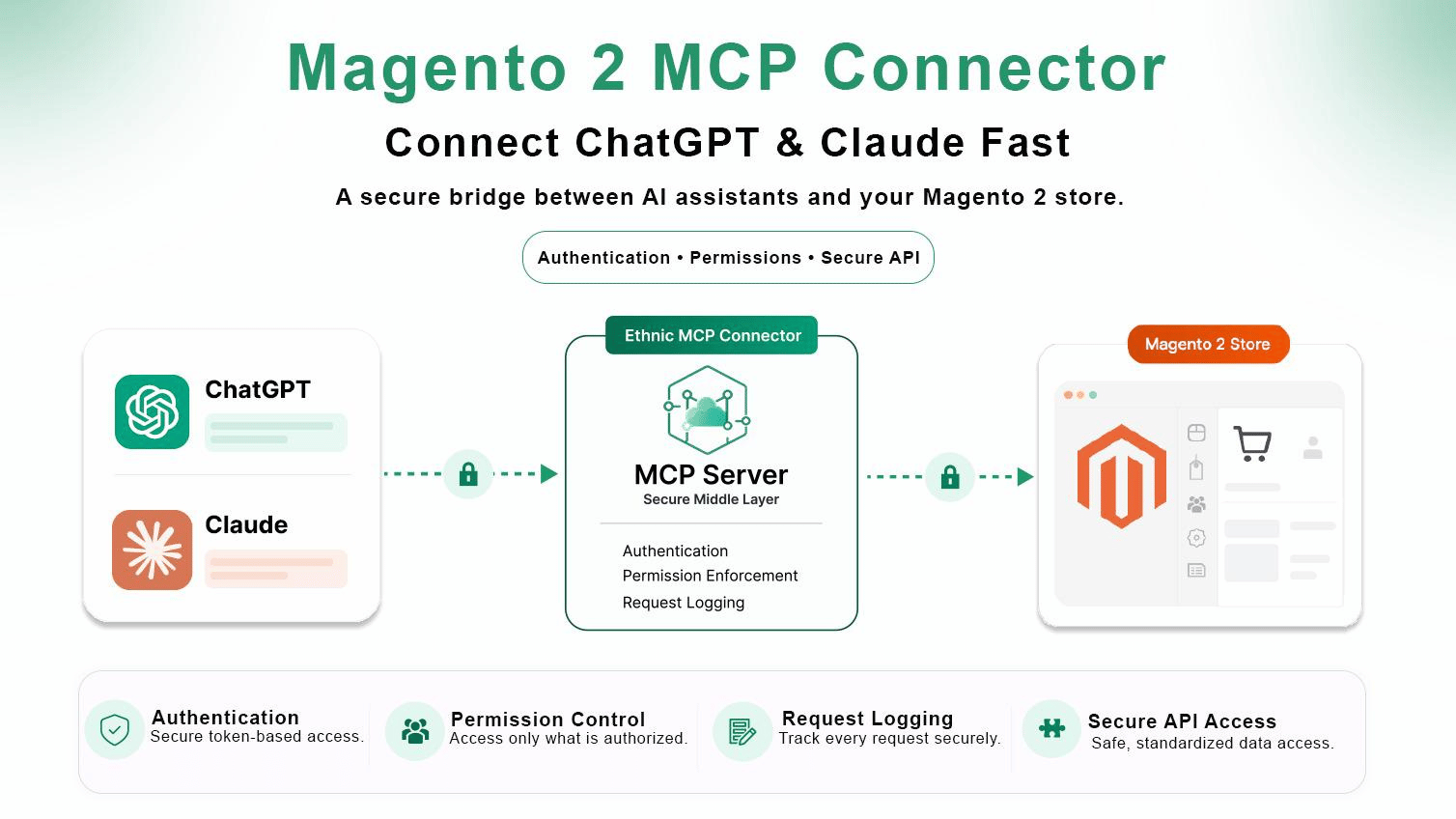
The Ethnic MCP Connector is a Magento 2 extension built on the Model Context Protocol (MCP), the open standard Anthropic introduced in late 2024 for letting AI systems talk to external tools and data. Instead of exporting spreadsheets or wiring up a custom API for every question you might want to ask, the connector gives your AI assistant a secure, standardized way to read your Magento data.
Think of it as three pieces talking to each other:
AI Assistant → MCP Server → Magento StoreThat’s it. No middleman dashboard. The AI asks, the connector fetches the answer from Magento, and you get a response you can actually use, with authentication and permissions enforced the whole way through.
Why Connect AI to Magento?
Every Magento store is sitting on more data than anyone actually looks at. Orders, customers, products, inventory, coupons, store configuration, admin users, system health. It’s all there. Most of it never gets used because pulling it out means navigating admin panels or building a custom report first.
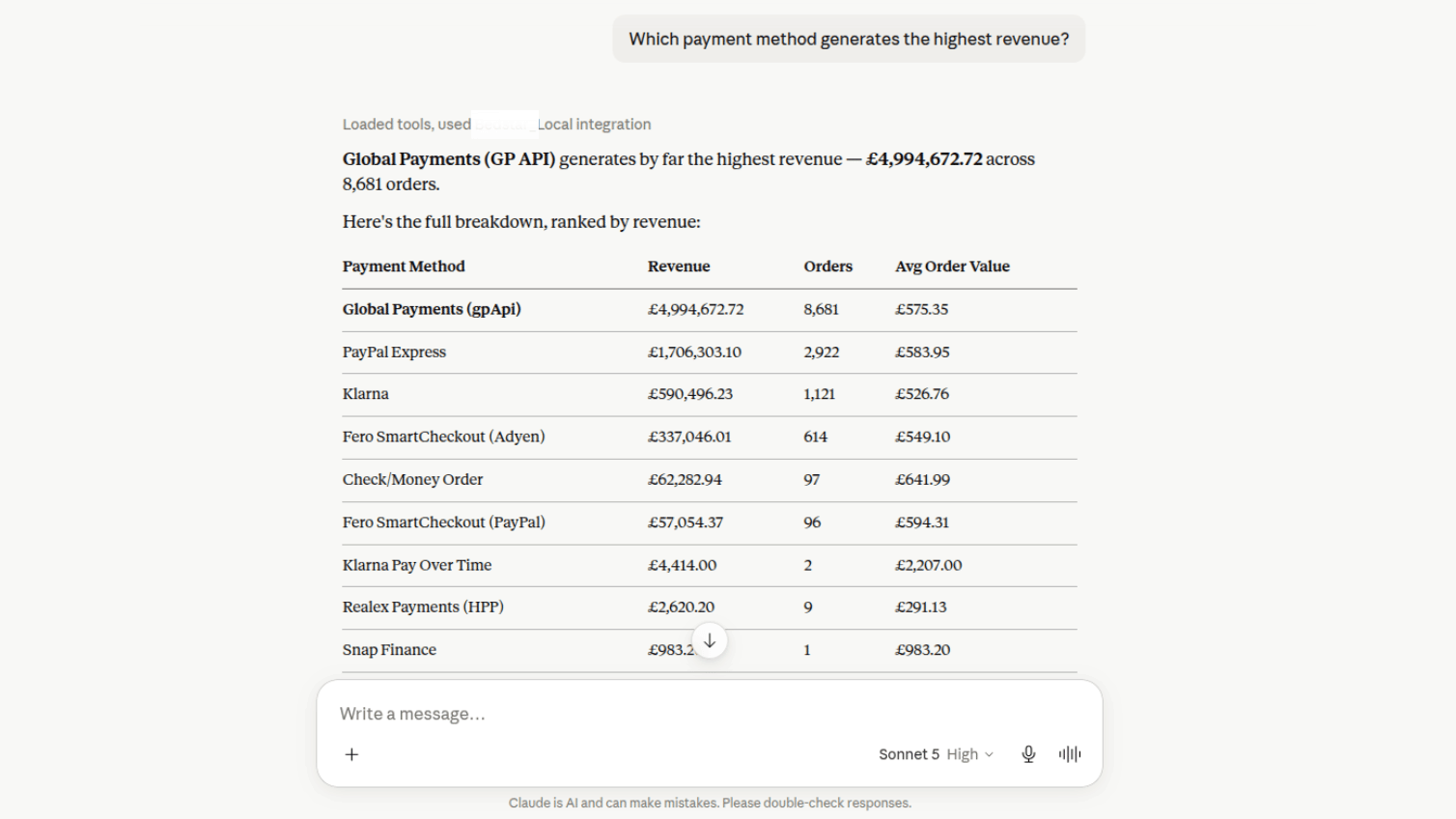
With a Magento 2 MCP connector in place, you skip that step entirely. Ask “show all orders above $500 placed this month,” and the AI goes and gets it. Ask “which payment method generates the highest revenue?” same thing. The answer shows up in seconds, not after twenty minutes of clicking through Sales > Reports.
Key Features
Here’s what makes this particular MCP connector worth setting up, feature by feature.
Secure AI Integration
Nothing gets exposed without authentication first. The module runs on OAuth and access tokens, so every AI client has to prove who it is before it touches your store data. No open doors.
Role-Based Access Control (ACL)
Not every AI assistant needs the keys to everything. Store admins can build custom ACL roles that scope exactly what a given AI client can see:
- Orders only
- Products only
- Customer information
- Inventory
- Marketing tools
- System information
- Administrative data
That granularity matters more than people expect. Give your customer support AI access to orders and customers, and nothing else. Keep admin data locked down for a separate, more trusted client. It’s the same principle you’d apply to a human employee’s login, just applied to an AI one.
Powerful Magento Data Access
The connector exposes a wide slice of Magento through purpose-built tools:
- Sales: Orders, Order Items, Quotes, Quote Items, Credit Memos
- Catalog: Products, Categories, Inventory, Product Prices, Tier Pricing, Tax Rules
- Customers: Customer Accounts
- Marketing: Cart Price Rules, Coupons
- Administration: Admin Users, Locked Admin Accounts
- System: Magento Version, PHP Version, MySQL, Redis, OpenSearch, Store Hierarchy
That’s most of what a store owner or manager would ever need to ask about, all reachable from the same conversation.
Natural Language Reporting
This is the part people notice first. No more building reports from scratch. You just ask:
- How many orders were placed this week?
- What’s my average order value?
- Which payment method generates the highest revenue?
- Show abandoned carts from yesterday.
- List products with inventory below 10.
The AI turns that into an optimized Magento query behind the scenes and hands back an answer that actually means something.
Advanced Analytics Without BI Software
Traditional business intelligence tooling usually demands SQL knowledge, dashboard building, and manual exports before you see a single insight. An MCP-connected AI assistant skips straight to the conversation:
A few things it can help with:
- Customer Intelligence: surface your most valuable customers and how they actually buy.
- Sales Performance: spot monthly trends and seasonal demand shifts.
- Inventory Optimization: flag slow movers and anything that needs restocking now.
- Churn Detection: find customers who’ve gone quiet and build a plan to win them back.
- Revenue Opportunities: pull upsell and cross-sell ideas straight from order history.
It doesn’t just spit out numbers either. It tells you why they matter, which is the part a raw export never does.
Flexible Filtering & Aggregation
Under the hood, the connector supports the filtering logic you’d expect from a real reporting tool:
- Equals
- Not Equals
- Greater Than
- Less Than
- Like
- In List
- Date Filtering
Plus aggregation:
- Count
- Sum
- Average
- Minimum
- Maximum
Grouped by month, day, customer, order status, payment method, or store. Put those together and a simple sentence can produce genuinely sophisticated analytics.
Compatible AI Platforms
The Ethnic MCP Connector works with:
- ChatGPT
- Claude Desktop
- Claude Code
- Other MCP-compatible AI clients
Model Context Protocol adoption moved fast. Monthly SDK downloads for the protocol reached 97 million by March 2026, up from around 100,000 in its first month back in late 2024, according to Anthropic’s own ecosystem reporting (as cited in Digital Applied’s MCP adoption analysis). That’s the kind of growth curve that turns a “maybe worth trying” protocol into infrastructure you can actually build a store integration on.
Enterprise-Grade Security
Security runs through every layer:
- OAuth Authentication
- Access Tokens
- HTTPS Communication
- Role-Based Permissions
- Separate AI Clients
- Token Rotation
- Permission Auditing
None of this is optional bolt-on stuff. It’s the baseline.
Installation
You can install the Ethnic MCP Connector two ways, Composer or manual. Composer’s faster if you’re comfortable with CLI. Manual works fine if you’d rather drop files in yourself.
GitHub Repository:https://github.com/Ethnic-Infotech/McpConnector
Method 1: Install via Composer (Recommended)
Run these from your Magento root directory:
composer require ethnic/module-mcp-connector php bin/magento module:enable Ethnic_McpConnector php bin/magento setup:upgrade php bin/magento cache:flushMethod 2: Manual Installation
Step 1: Download the Module
Grab the latest release from the GitHub repository and extract it into:
app/code/Ethnic/McpConnector/Step 2: Enable the Module
Then run:
php bin/magento module:enable Ethnic_McpConnector php bin/magento setup:upgrade php bin/magento cache:flushPost-Installation Configuration
Once it’s installed and enabled, finish setup from the Magento Admin Panel:
- Create an ACL Role.
- Create an AI Client.
- Generate an OAuth Access Token.
- Configure and connect your AI assistant (ChatGPT or Claude).
- Verify the connection.
- Start asking your Magento store questions in plain English.
Realistically, the whole thing takes a few minutes once you know where the settings live. The GitHub repo has the full configuration guide if you get stuck on any step.
Configuration Documentation:
What Actually Happened When We Set This Up for a Client
We rolled an early version of this MCP connector out for one of our Magento clients running a mid-size catalog, somewhere in the $40k to $60k a month GMV range, back when we were still stress-testing the ACL permission model. First attempt, honestly, wasn’t smooth. We’d scoped the AI client too broadly, and it could see admin user data it had no business seeing.
That got fixed fast. Once we tightened the role down to orders, products, and inventory only, the difference was immediate. Their ops lead stopped building the Monday spreadsheet altogether. She just asked Claude “what’s under 10 units in stock” before her first coffee, and had a restock list before the kettle finished boiling.
I won’t pretend it replaces a proper BI setup for a store doing millions a month with a dedicated analyst. It doesn’t need to. For the store owner asking three or four questions a week, it’s the difference between doing the reporting and just… asking.
| Task | Traditional BI Setup | AI Assistant via MCP Connector |
|---|---|---|
| Time to first insight | Hours to days (report build) | Seconds (ask directly) |
| Technical skill needed | SQL, dashboard tools | Plain English |
| Ongoing maintenance | Reports need rebuilding as needs change | Just ask a new question |
| Cost | Separate BI license or analyst hours | Runs on tools you may already use |
Ready to Connect AI With Your Magento Store?
Connect ChatGPT and Claude to Magento 2 and access sales, orders, inventory, customer data, and store insights using simple natural-language questions—without manual reports or complicated data exports.
Real Business Use Cases
A Magento 2 MCP connector fits naturally for:
- Magento Store Owners
- eCommerce Managers
- Marketing Teams
- Customer Support Managers
- Inventory Managers
- Sales Analysts
- Agencies Managing Multiple Magento Stores
Instead of generating reports by hand, teams get answers on demand, and that adds up fast across a week.
Benefits for Your Business
Running a Magento 2 MCP connector alongside your store tends to show up in a few concrete ways:
- Save hours of manual reporting.
- Make faster business decisions.
- Improve customer retention.
- Optimize inventory levels.
- Increase sales through AI-generated recommendations.
- Monitor store health in real time.
- Access critical insights using plain conversational language.
Magento itself still carries real weight in the market worth noting here. Adobe Commerce and Magento Open Source together power somewhere around 130,000 to 160,000 live stores globally, holding roughly 8% of the ecommerce platform market by most current tracking, according to MGT-Commerce’s 2026 market share analysis. That’s a large, mostly enterprise and B2B-leaning install base, exactly the kind of store where a few hours saved on reporting each week actually moves the needle.
Frequently Asked Questions
What is a Magento 2 MCP connector?
It’s a Magento 2 module built on the Model Context Protocol that lets AI assistants like ChatGPT and Claude query your store’s live data, orders, products, customers, inventory, directly through natural language instead of manual reports.
How do I install the Ethnic MCP Connector on Magento 2?
Composer is the fastest route: run composer require ethnic/module-mcp-connector, then enable the module, run setup:upgrade, and flush the cache. Manual install works too if you’d rather extract the files into app/code yourself.
Is the Ethnic MCP Connector free to use?
The module is available through the GitHub repository under Ethnic Infotech. For current licensing and any paid tiers tied to specific AI client limits, check the repo or reach out to the team directly, since that detail can shift between releases.
Is it safe to connect ChatGPT or Claude to my Magento store?
Yes, assuming it’s configured properly. The connector runs on OAuth authentication, access tokens, and role-based ACL permissions, so an AI client only ever sees the data scope you’ve explicitly granted it. The risk isn’t the protocol, it’s giving a client broader access than it needs.
ChatGPT or Claude, which works better with the MCP connector?
Honestly, both work fine since the connector is MCP-standard and platform-agnostic. In practice, we’ve found Claude Desktop and Claude Code slightly smoother for longer analytical back-and-forth, while ChatGPT feels quicker for one-off lookups. Pick whichever your team already lives in.
Why isn’t my AI assistant pulling any Magento data after setup?
Usually it’s the ACL role. Double-check the AI client was assigned a role with access to the resource you’re asking about, and confirm the OAuth token hasn’t expired. Ninety percent of “it’s not working” cases we’ve seen trace back to one of those two things.
Do I need to know how to code to set this up?
Not really, if you’re comfortable running a handful of CLI commands. The Composer method is copy-paste. The trickier part is the ACL role setup afterward, and that’s done through the Magento Admin Panel, no code required.
What Magento data can I actually access through an MCP connector in 2026?
As of now, the Ethnic MCP Connector covers sales, catalog, customers, marketing tools, admin users, and system health, essentially every core area a store owner or manager would want to ask about, minus deeply custom third-party module data unless it’s separately exposed.
Conclusion
AI is changing how people interact with their own business data, and Magento stores have been sitting on more of it than most owners realize. The Ethnic MCP Connector closes that gap by giving ChatGPT and Claude secure, direct, conversational access to your Magento store, no spreadsheets required.
If you’re weighing whether this fits your setup, our Magento 2 MCP Connector launch guide covers the original rollout in more depth, and it’s worth reading alongside this one. Our Magento development team also handles the ACL and configuration work directly if you’d rather not touch the CLI yourself, and our AI chatbot development service can extend this into a full conversational layer for customers, not just your internal team.
Still running Magento 1, or mid-migration? Our Magento 1 to Magento 2 migration guide is worth a look before you start layering AI tools on top of an older setup. And if you want the wider context on where AI is heading in ecommerce generally, we broke that down in how AI is transforming ecommerce for modern businesses.
If you’re looking to bring ChatGPT and Claude directly into your Magento workflow, this is a solid, secure, and genuinely useful place to start.
Bring ChatGPT and Claude Directly Into Your Magento Workflow
If you’re looking to bring ChatGPT and Claude directly into your Magento workflow, this is a solid, secure, and genuinely useful place to start.
Planning your next product, platform, or growth move?
Ethnic Infotech helps teams shape scalable software, sharper customer experiences, and content systems that support real business growth.