
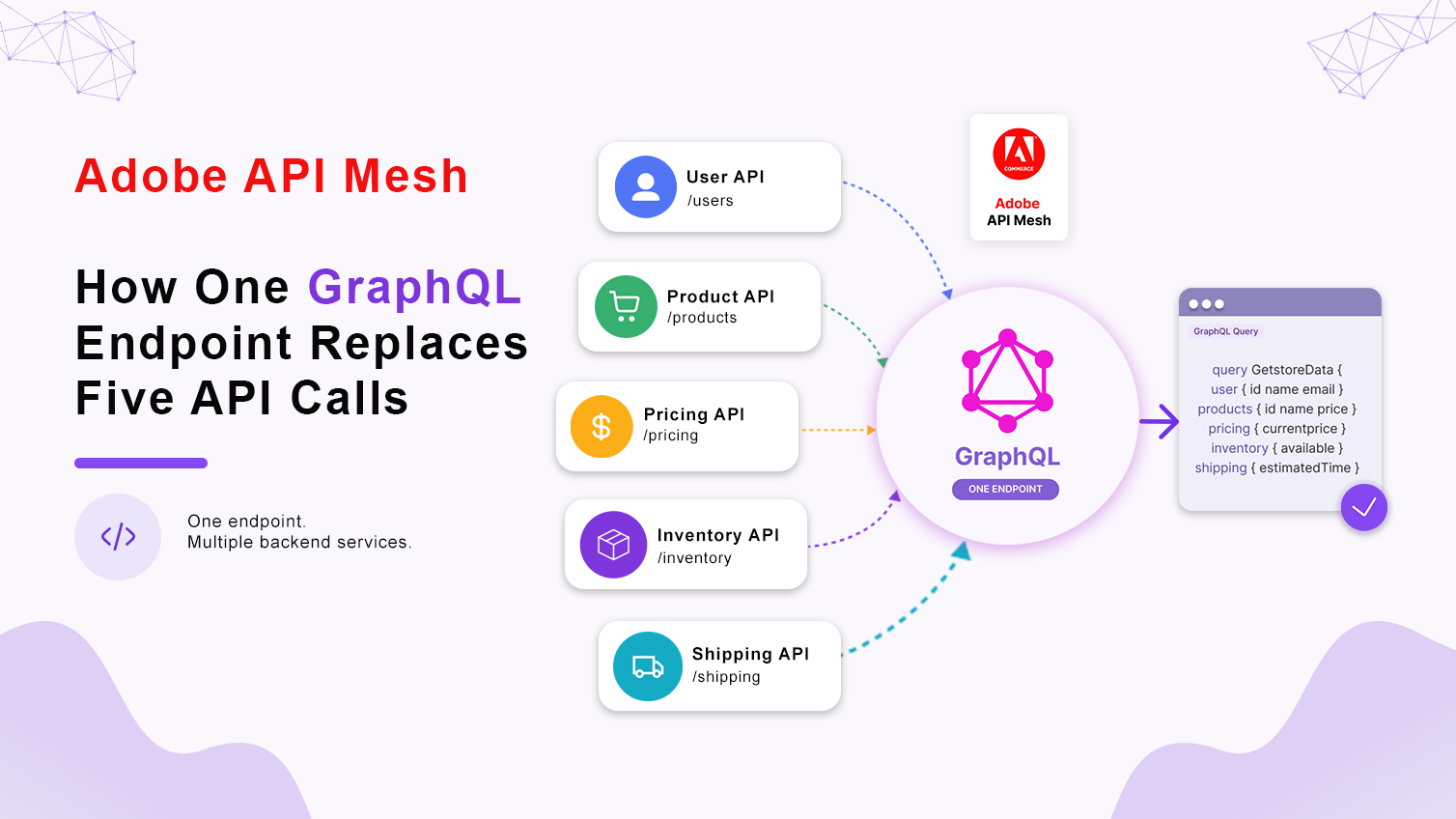
Fast answer: Adobe API Mesh is a cloud service that sits in front of Adobe Commerce GraphQL, REST, SOAP, gRPC, and OpenAPI sources and merges them into a single GraphQL endpoint. Instead of a storefront making separate calls to Commerce, an ERP, a PIM, and a CRM, it sends one query to the mesh and gets one response back, with schema stitching handling the merge behind the scenes.
At Ethnic Infotech, we build and extend Adobe Commerce as a Cloud Service (ACCS) for international brands, and API Mesh has become one of the first things we reach for on any project where the storefront needs data from more than one place. This guide walks through what it is, why teams reach for it, how it actually behaves in production, and where it trips people up the first time.
The Problem Before Adobe API Mesh
Adobe Commerce as a Cloud Service already ships with a solid GraphQL API for products, categories, customers, cart, checkout, and orders. The trouble starts the moment your storefront needs anything Commerce doesn’t own. Inventory that lives in an ERP. Rich specs that live in a PIM. Loyalty balances that live in a CRM. Shipping estimates from a carrier’s own API.
Without a mesh in between, every one of those becomes a separate network request from the frontend, each with its own auth, its own error handling, and its own chance to be the slow one that holds up the page. Multiply that across a catalog with thousands of SKUs and a handful of external systems, and frontend teams end up writing more integration glue code than storefront code. Recent integration research backs up why this keeps happening: MuleSoft’s Connectivity Benchmark Report found the average enterprise now runs on close to 900 applications, with roughly 71% of them still not connected to each other. That’s the sprawl Adobe API Mesh is designed to sit on top of, not replace.
What Is Adobe API Mesh?
Adobe API Mesh for Adobe Developer App Builder is a managed gateway that aggregates GraphQL, REST, SOAP, and gRPC sources into a single GraphQL schema. You don’t rewrite the backend services. You describe them in a mesh configuration, and the gateway handles routing, schema stitching, and response merging so the client only ever talks to one endpoint.
For Adobe Commerce specifically, that usually means:
- Combining multiple APIs into one endpoint.
- Simplifying frontend data fetching so the storefront team writes one query instead of four fetch calls.
- Transforming and reshaping data from different sources into a schema that actually matches what the UI needs.
- Cutting the number of network round trips a page has to make.
- Building integrations without touching Adobe Commerce core or the backend services on the other end.
That last point matters more on ACCS than it would on-premises. Adobe Commerce as a Cloud Service is SaaS, which means there’s no server to SSH into and no local module to drop into app/code. We covered that same constraint in our guide on how to subscribe to webhooks in Adobe Commerce as a Cloud Service, and it applies here too. API Mesh, like webhooks, is one of the few doors Adobe left open for out-of-process customization on a SaaS instance.
Why Use API Mesh?
Here’s the thing nobody tells you until you’ve built a storefront without one: every extra backend system your frontend has to call directly is a separate point of failure, a separate auth flow, and a separate thing a frontend developer has to understand just to render a page.
Without API Mesh, a storefront or custom application typically ends up calling several APIs independently:
- Adobe Commerce GraphQL API
- ERP API
- CRM API
- Inventory API
- Product Information Management (PIM) API
Each one of those adds its own complexity, its own latency, and its own maintenance overhead. Change one backend system’s schema and every frontend that calls it directly has to change too. With API Mesh, all of those APIs get exposed through a single GraphQL endpoint instead, which makes the whole integration layer simpler to build, easier to reason about, and a lot less fragile when a backend system changes shape.
How Adobe API Mesh Works
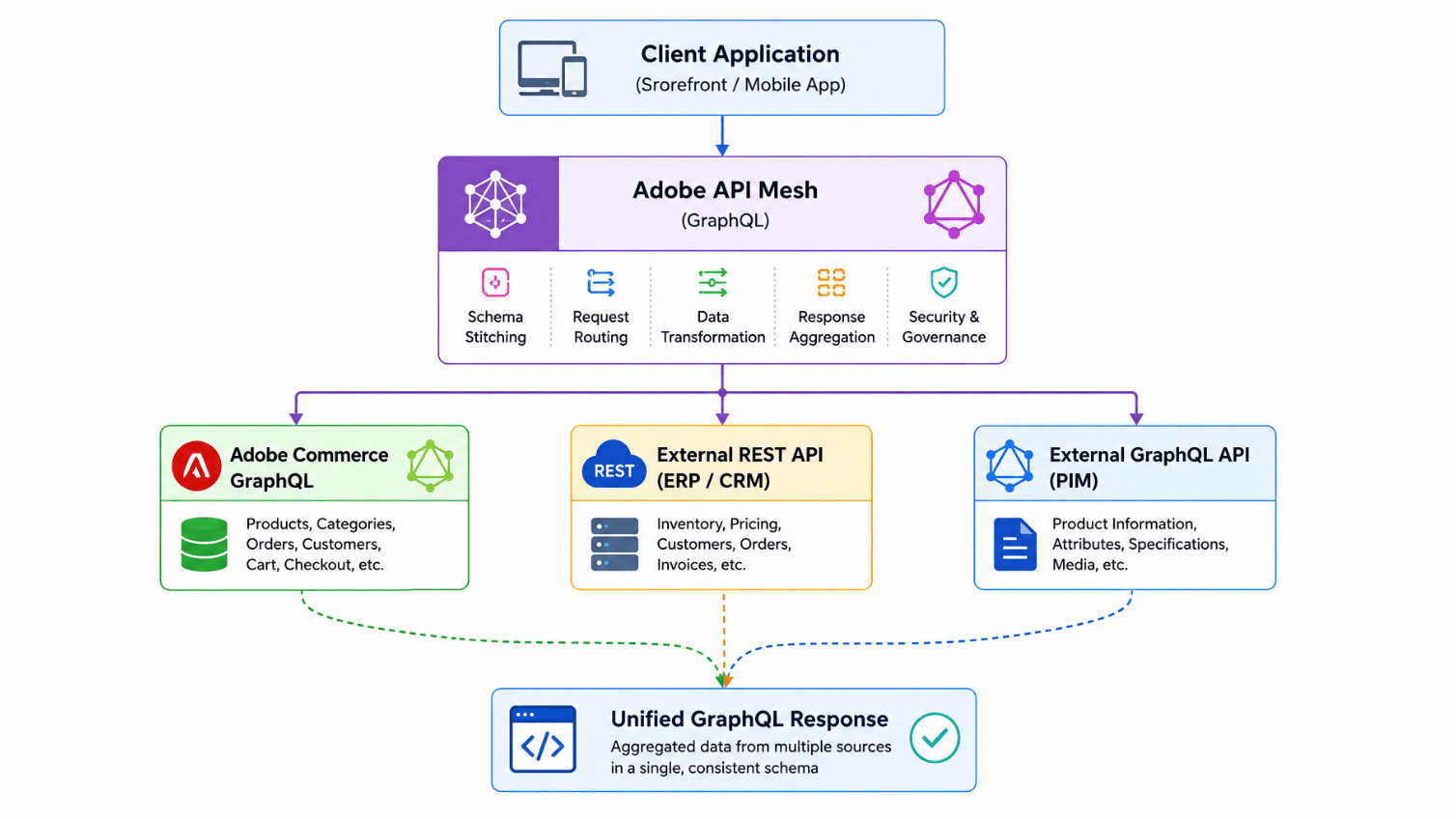
A mesh has four moving pieces, and once you’ve mapped them out on a whiteboard once, the rest of the configuration makes a lot more sense.
Key Components
Adobe Commerce GraphQL
Supplies product, category, customer, cart, checkout, and order data straight from Commerce, using the native GraphQL API Commerce already ships with.
External APIs
The other systems the mesh connects to. In practice, that’s usually some combination of:
- ERP
- CRM
- Shipping
- Payment gateway
- Inventory
- PIM
- Recommendation engine
API Mesh Gateway
The actual routing layer. It’s the piece that does the real work: routing incoming requests to the right source, merging schemas from every connected system, resolving data across sources, and handing back one unified GraphQL response.
Client Application
Your storefront, mobile app, or any other consumer that talks to exactly one GraphQL endpoint, no matter how many backend systems sit behind it. The client never has to know that a “product” object in the response is actually assembled from three different services. That abstraction is the entire point of Adobe Commerce API Mesh: the frontend team writes a query against a schema, not against five separate integration contracts.
What API Mesh Supports
One thing that surprises people the first time they read the docs: API Mesh isn’t a GraphQL-only tool that happens to talk to GraphQL sources. It’ll wrap almost anything.
| API Type | Supported |
|---|---|
| GraphQL | Yes |
| REST | Yes |
| SOAP | Yes |
| gRPC | Yes |
| OpenAPI | Yes |
That breadth is what makes it realistic to modernize an integration layer without a rewrite. A ten-year-old SOAP-based ERP connector doesn’t need to become a GraphQL service before it can sit behind a mesh. It just needs a source definition.
Benefits of Adobe API Mesh
Once a mesh is actually running in front of a Commerce storefront, the benefits show up in a few concrete places:
- A unified GraphQL endpoint the whole frontend team can build against.
- Noticeably reduced frontend complexity, since integration logic moves out of the client and into the mesh configuration.
- Better performance, from fewer round trips and less client-side waterfalling.
- Schema stitching and federation, so multiple systems can be represented as one coherent graph.
- Centralized API management instead of integration logic scattered across every consuming app.
- Backend abstraction, so the frontend never has to know or care how many systems a field actually came from.
- Extensibility without modifying core services, which matters even more once you’re on a SaaS platform like ACCS.
A Real Product Page Example
Take the product page scenario from the top of this guide. A shopper lands on a PDP and the page needs:
- Product details from Adobe Commerce
- Inventory levels from an ERP
- Product specifications from a PIM
- Customer loyalty points from a CRM
Without a mesh, that’s four separate calls, four separate failure points, and four separate response times stacking up against your page load. With the mesh in place, the frontend sends one query like the one below and gets everything back together.
query GetProductDetails($sku: String!) { products(filter: { sku: { eq: $sku } }) { items { name sku price_range { minimum_price { regular_price { value currency } } } } }}The mesh configuration extends this same query with resolvers pointing at the ERP, PIM, and CRM sources, so the response the client actually receives can include inventory, specs, and loyalty data alongside the native Commerce fields, all inside one schema.
What Changed When We Put a Mesh in Front of a Slow Product Page
We ran into a version of this exact scenario on an ACCS build for a UK catalog retailer with a genuinely large SKU count. Their PDP was making four sequential client-side calls: Commerce GraphQL first, then the ERP for stock, then the PIM for specs, then the CRM for loyalty points, each one waiting on the last. On a slow connection, that queue alone added over a second to time-to-interactive, and the ERP call in particular had no retry logic, so any hiccup on that system’s side left the stock badge blank.
First pass, we tried caching the ERP response client-side to paper over the latency. It helped a little and created a new problem: stale stock numbers showing “in stock” on items that had just sold out. That wasn’t a caching problem, it was an architecture problem. We rebuilt the PDP data layer behind API Mesh instead, with the ERP and PIM wired in as sources and the CRM loyalty field resolved only when a customer session was present, so guest visitors weren’t paying for a CRM round trip they didn’t need. Once that shipped, the PDP went from four sequential requests to one mesh query, and the blank stock badge issue disappeared because failed source calls in the mesh return null for that field instead of failing the whole page.
Ready to Simplify Your Commerce Integrations?
Use Adobe API Mesh to combine Adobe Commerce, ERP, CRM, PIM, and third-party APIs into a single GraphQL endpoint reducing development effort, improving performance, and creating scalable commerce experiences.
Common Use Cases
Beyond the product page example, the same pattern shows up across most of the mesh implementations we’ve built:
- Product information enrichment
- Inventory synchronization
- ERP integration
- CRM integration
- Shipping and logistics data
- Personalized recommendations
- Customer loyalty information
- Unified storefront APIs
API Mesh vs Traditional API Integration
Laid side by side, the difference in day-to-day complexity is stark:
| Feature | Traditional Integration | Adobe API Mesh |
|---|---|---|
| API Endpoints | Multiple | Single |
| Frontend Complexity | High | Low |
| Data Aggregation | Manual | Automatic |
| Network Requests | Multiple | One |
| Backend Changes Required | Often | Rarely |
| GraphQL Support | Optional | Native |
API Mesh and Adobe App Builder
API Mesh and Adobe App Builder do different jobs and are usually used together rather than as alternatives:
- It aggregates and exposes APIs through one unified GraphQL interface.
- Adobe App Builder runs custom business logic, processes events, and talks to external systems through serverless actions.
A typical flow looks like this:
- A customer places an order in Adobe Commerce.
- Adobe Commerce publishes an event.
- Adobe App Builder processes that event and syncs the order to an ERP.
- Adobe API Mesh exposes the updated ERP order status alongside native Commerce data, through the same GraphQL query the storefront already uses.
That pairing gives you both the integration logic (App Builder) and the unified read layer without either one trying to do the other’s job.
Best Practices for Adobe Commerce API Integration
A few habits separate a mesh that stays maintainable from one that turns into its own tangle six months in:
- Keep schemas well-organized and documented, especially once more than one developer is adding sources.
- Cache where it makes sense, particularly for slow-changing data like PIM specs.
- Secure every backend connection with proper authentication, not a shared static key everyone forgets is still active.
- Monitor performance and error rates per source, not just at the gateway level.
- Keep schema complexity in check. A mesh that tries to expose every field from every system becomes as hard to reason about as the sprawl it replaced.
- Use the mesh to orchestrate data, not to replace complex business logic that belongs in App Builder or Commerce itself.
Common Mistakes
These are the ones we see most often on a team’s first Adobe API Mesh implementation.
Treating the mesh as a cache instead of a gateway.
A mesh doesn’t store data by default. If a source is genuinely slow, that latency shows up in the merged response too, unless caching is configured deliberately at the field or query level.
Exposing every field from every source “just in case.”
It’s tempting to mirror the entire ERP or PIM schema into the mesh on day one. That makes the schema harder to document, harder to secure, and harder for frontend developers to actually use.
No fallback for a failed source.
If one backend in the mesh times out, the whole query shouldn’t fail. Configuring resolvers so a failed source returns null for its fields, rather than breaking the response, is what kept our product page example above from showing a blank screen.
Skipping authentication on “internal” sources.
An ERP or PIM connection that’s only ever called from inside the mesh still needs real authentication. Treating it as trusted because it’s not public-facing is a common gap.
Building the mesh before the schema is agreed with the frontend team.
Mesh configuration changes are cheap. Rebuilding a storefront’s data-fetching layer around a schema that shifts every sprint is not.
FAQ
What is Adobe API Mesh used for?
It’s used to combine Adobe Commerce GraphQL with other backend APIs, such as ERP, CRM, PIM, or shipping systems, into one GraphQL endpoint so a storefront or app only has to make one request instead of several.
Does Adobe API Mesh require rewriting my existing APIs?
No. It wraps existing GraphQL, REST, SOAP, gRPC, and OpenAPI sources as they are. You configure how the mesh talks to them; you don’t rebuild the backend services.
Is API Mesh only for Adobe Commerce?
It’s most commonly used with Adobe Commerce, but it’s a general-purpose Adobe App Builder service, so it can front any combination of GraphQL and REST-style sources, Commerce or otherwise.
How is API Mesh different from Adobe App Builder?
It aggregates and exposes data through a unified GraphQL layer. App Builder runs custom business logic and event-driven workflows. Most real implementations use both together.
Does adding API Mesh slow down my storefront?
The mesh itself adds a small routing overhead, but it typically nets out faster than the alternative, since it replaces several sequential client-side calls with one request. The overall speed still depends on how slow the underlying sources are.
Can API Mesh handle a source going down without breaking the whole page?
Yes, if it’s configured that way. Resolvers can be set to return null for a failed source’s fields instead of failing the entire query, which is worth setting up deliberately rather than assuming it’s the default behavior.
Do I need Adobe Commerce as a Cloud Service specifically to use it?
No, but it’s especially useful on ACCS because the platform doesn’t allow core code changes. Mesh-based integration is one of the few extensibility paths available on a SaaS instance.
Is API Mesh still relevant in 2026 given how much AI-driven data fetching has grown?
Yes. If anything, a single well-documented GraphQL schema is more useful now, since it gives both frontend teams and AI agents one consistent contract to query instead of several inconsistent ones.
Conclusion
The product page problem at the start of this guide isn’t unusual. Most Adobe Commerce implementations end up talking to more than one system, and every one of those integrations adds a network call, a set of credentials, and a new way for a page to fail. Adobe API Mesh doesn’t remove that complexity, but it moves it out of the frontend and into a single, configurable layer that a backend team can maintain without rewriting Commerce or the systems around it.
Paired with Adobe App Builder for the event-driven side of things, API Mesh gives ACCS merchants a genuinely workable extensibility architecture, one unified schema for reads, one set of serverless actions for the logic that needs to run in between.
If you’re planning a broader Adobe Commerce build
If you’re weighing API Mesh against other extensibility options for an ACCS project, our Adobe Commerce development services page covers where mesh-based integration fits against webhooks and App Builder actions. If your storefront needs are leaning headless entirely, our headless commerce development work with GraphCommerce covers a related but different path. For a look at how we approached a similar catalog and integration challenge end to end, see our Adobe Commerce optimization work for Bedstar, and if you’re still deciding whether to replatform before tackling integration, our ecommerce replatforming guide is a useful next read. Reference material for the platform side, straight from Adobe, is in the API Mesh for Adobe Developer App Builder documentation and the API Mesh getting started tutorialand with that you can also check our resources.
Planning your next product, platform, or growth move?
Ethnic Infotech helps teams shape scalable software, sharper customer experiences, and content systems that support real business growth.