
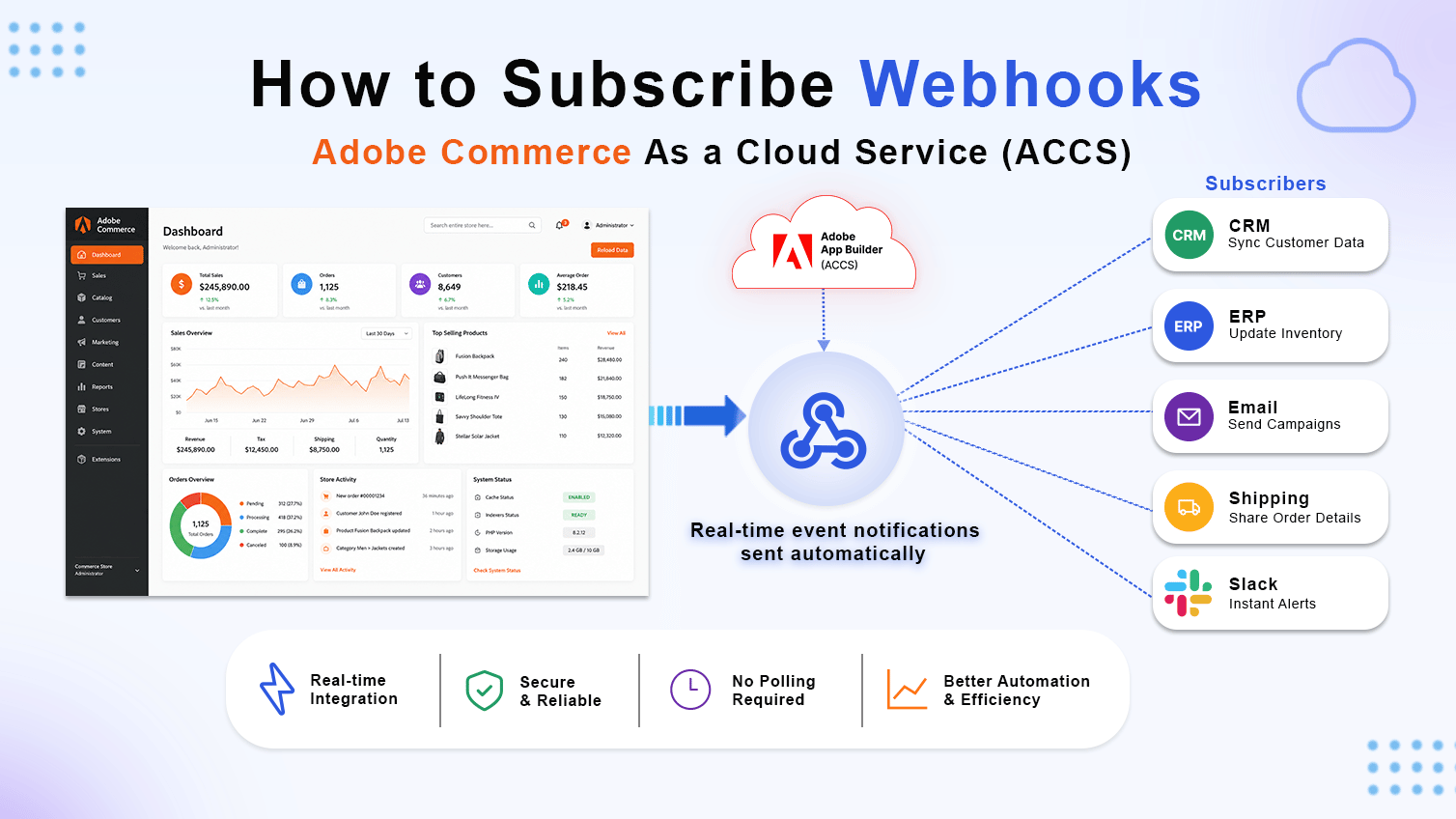
Fast answer: Webhooks in Adobe Commerce as a Cloud Service let you hook a Commerce plugin or observer method to an external HTTPS endpoint – typically an Adobe App Builder action – so Commerce can send event data out, wait for a response, and act on it before or after that method runs. You configure the whole thing from System → Webhooks in the Admin, no core code required.
At Ethnic Infotech, we’re an ecommerce development company that spends a good chunk of its week inside Adobe Commerce and Magento builds for international brands, and ACCS webhook subscriptions have become one of our go-to tools for out-of-process customization. This guide walks through the exact Admin workflow, field by field, plus what actually goes wrong when teams set one up for the first time.
The Problem With Customizing Adobe Commerce as a Cloud Service
If you’ve worked with Adobe Commerce as a Cloud Service, you already know the constraint. It’s SaaS. There’s no server to SSH into, no core files to extend, no local module you can drop into app/code. Your merchant wants inventory checked against a warehouse system before checkout completes. Or a payment gateway needs to run fraud scoring before an order confirms. Or finance wants custom fee logic pulled from a pricing engine instead of a static rule in Commerce.
In a PaaS or on-premises world, you’d write a plugin. On ACCS, that door is closed. So how do you get Commerce to talk to an outside system, mid-process, without touching core? Setting up a webhook subscription is the answer Adobe built for this exact gap.
What is a Webhook?
A webhook is a mechanism that enables one application to automatically send real-time data to another application when a specific event occurs. Unlike traditional APIs, where an application must repeatedly request (poll) data to check for updates, a webhook proactively pushes the information to a configured endpoint as soon as the event happens.
For example, when a customer places an order in Adobe Commerce, the platform can immediately send the order details to an external system such as an ERP, CRM, payment gateway, or shipping provider. This allows systems to stay synchronized without requiring continuous API requests.
How Does a Webhook Work?
The webhook process is straightforward and consists of four main steps:
- An event occurs – A business event takes place in Adobe Commerce, such as an order being placed, a customer registering, or a product being updated.
- Adobe Commerce detects the event – The platform identifies that the configured event has occurred.
- A webhook request is sent – Adobe Commerce sends an HTTP POST request containing the event data (payload) to the webhook URL configured by the administrator.
- The external application processes the request – Your application receives the payload, processes the data, performs the required business logic, and returns an HTTP response (typically 200 OK) to acknowledge successful receipt.
That fourth step is where most first-time ACCS webhook subscriptions go sideways, and we’ll get into why further down.
Prerequisites
Before creating a webhook subscription in Adobe Commerce as a Cloud Service, ensure you have the following:
- Access to the Adobe Commerce Admin Panel
- An Adobe App Builder application (or another HTTPS endpoint) ready to receive webhook requests
- Administrator permissions to manage Webhooks
- A basic understanding of Adobe Commerce plugins or observer methods
Step 1: Open the Webhooks Section
This is where the actual webhook subscription in Adobe Commerce as a Cloud Service gets built. Log in to your Adobe Commerce Admin Panel and navigate to:
System → Webhooks
Under the Webhooks section, you’ll find three management pages:
- Webhooks List – Displays all registered webhooks.
- Webhooks Subscriptions – Used to create and manage webhook subscriptions.
- Webhooks Logs – Displays execution history and debugging information.
To create a new webhook:
- Open Webhooks Subscriptions
- Click Add New Webhook
This opens the webhook configuration page.
Step 2: Configure the Webhook
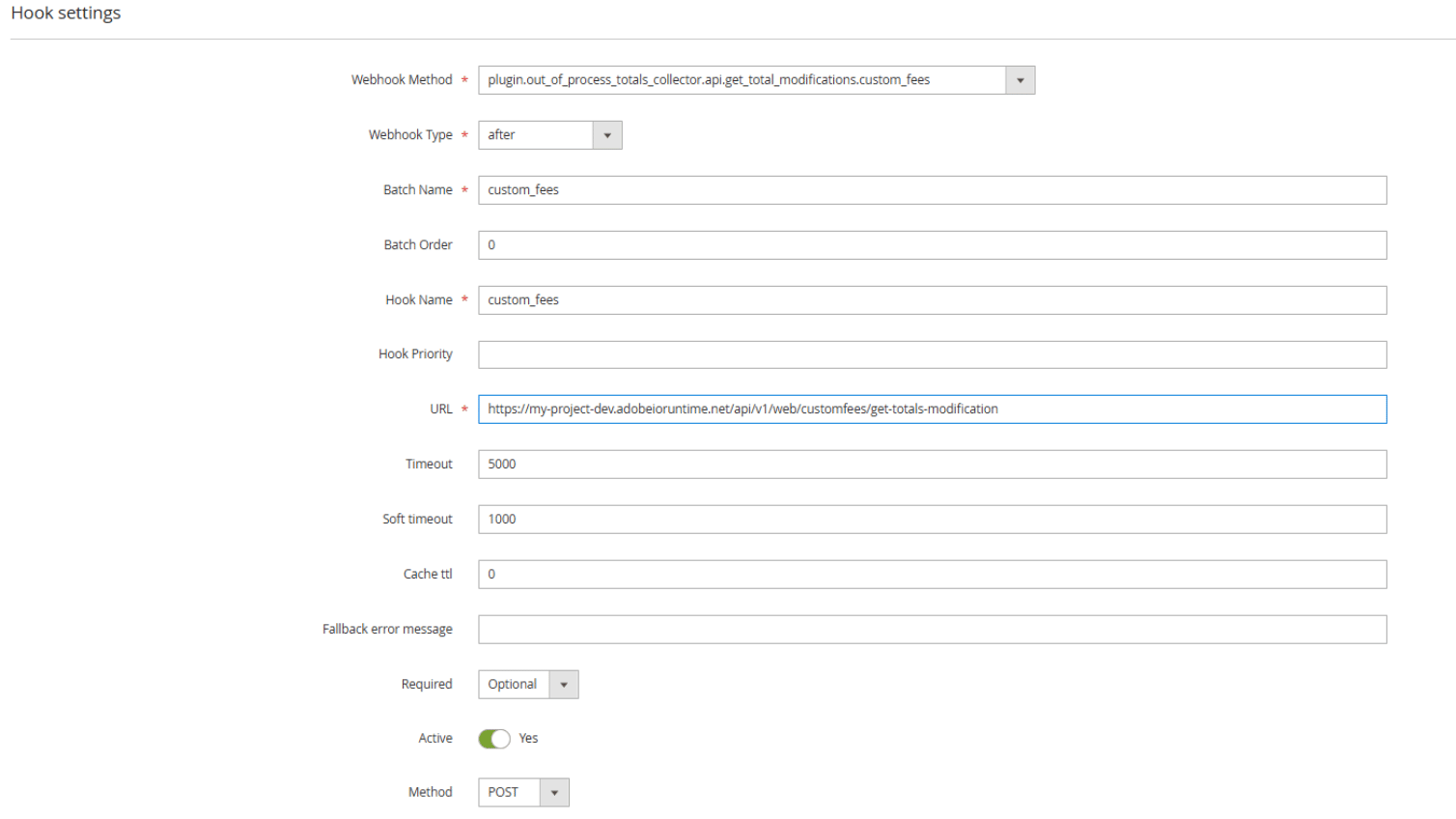
The webhook configuration page contains several fields that determine when and how Commerce communicates with your external service.
Webhook Method
Specify the Commerce plugin or observer method that should trigger the webhook. Example:
plugin.out_of_process_totals_collector.api.get_total_modifications.custom_feesThis identifies the Commerce method that will invoke your webhook.
For this example method, here is the payload
{ "quote": { "entity_id": "int", "is_active": "bool", "items_count": "int", "items_qty": "float", "store_id": "int", "customer_group_id": "int", "customer_tax_class_id": "int", "subtotal": "float", "subtotal_with_discount": "float", "grand_total": "float", "base_subtotal": "float", "base_grand_total": "float", "currency": { "base_currency_code": "string", "store_currency_code": "string", "quote_currency_code": "string", "extension_attributes": "object{}" } }, "shippingAssignment": { "shipping": { "address": "object{}", "method": "string", "extension_attributes": "object{}" }, "items": [ { "item_id": "int", "sku": "string", "qty": "float", "name": "string", "price": "float", "product_type": "string", "row_total": "float", "tax_amount": "float", "discount_amount": "float" } ], "extension_attributes": [] }, "total": { "subtotal": "float", "base_subtotal": "float", "base_virtual_amount": "float", "virtual_amount": "float", "custom_fee_amount": "float", "base_custom_fee_amount": "float", "base_grand_total": "float", "grand_total": "float", "tax_amount": "float", "base_tax_amount": "float", "discount_tax_compensation_amount": "float", "base_discount_tax_compensation_amount": "float", "subtotal_incl_tax": "float", "base_subtotal_total_incl_tax": "float", "base_subtotal_incl_tax": "float", "discount_amount": "float", "base_discount_amount": "float", "discount_description": "string", "subtotal_with_discount": "float", "base_subtotal_with_discount": "float" } }It’s get from Webhooks List
Webhook Type
Choose when the webhook should execute.
| Type | Description |
|---|---|
| before | Executes before the Commerce method runs. |
| after | Executes after the Commerce method completes. |
Use before when your external service needs to validate or modify data before Commerce continues. Use after when you only need to react to an event after Commerce has completed its operation.
Batch Name
Batch Name groups multiple related webhooks together. Example: inventory_check_batch. Grouping webhooks allows them to execute together in a predictable sequence.
Batch Order
Batch Order determines the execution order of webhooks within the same batch. Example: 0. Lower numbers execute first.
Hook Name
Provide a unique name that identifies the webhook. Example: inventory_stock_validator. Choose a descriptive name that clearly represents the webhook’s purpose.
Hook Priority
If multiple hooks subscribe to the same Commerce method, Priority determines their execution order. Lower priority values execute before higher values.
URL
Specify the endpoint that receives webhook requests. For Adobe App Builder, this is typically an Adobe I/O Runtime action URL. Example:
https://my-project-dev.adobeioruntime.net/api/v1/web/inventory/validate-stockWhenever the selected Commerce method executes, Adobe Commerce sends an HTTP request to this endpoint. This is the field that ties the webhook subscription directly to your App Builder integration, so double-check it’s the deployed action URL and not a local dev URL before this goes anywhere near production.
Timeout
Defines the maximum amount of time Commerce waits for a response. Example: 5000 ms. If the endpoint does not respond within this period, the webhook fails.
Soft Timeout
Soft Timeout specifies a warning threshold. Example: 1000 ms. If the response exceeds this value, Commerce records a warning in the logs but continues waiting until the full timeout is reached.
Cache TTL
Controls how long webhook responses are cached. Example: 0. A value of 0 disables caching. Higher values, in seconds, cache responses when appropriate. Caching can improve performance for responses that do not change frequently.
Fallback Error Message
Provide a user-friendly message displayed when a Required webhook fails. Example: “Stock validation service is currently unavailable. Please try again later.” This improves the customer experience by displaying a meaningful message instead of a generic error.
Required
Choose whether Commerce should continue if the webhook fails.
| Option | Behavior |
|---|---|
| Optional | Commerce continues even if the webhook request fails. |
| Required | Commerce stops the operation if the webhook fails. |
Use Required only when the external validation is essential, such as payment authorization or inventory verification.
Active
Enable this option to activate the webhook immediately after saving.
HTTP Method
Select the HTTP method used to invoke your endpoint. Typically: POST.
Step 3: Configure Additional Sections
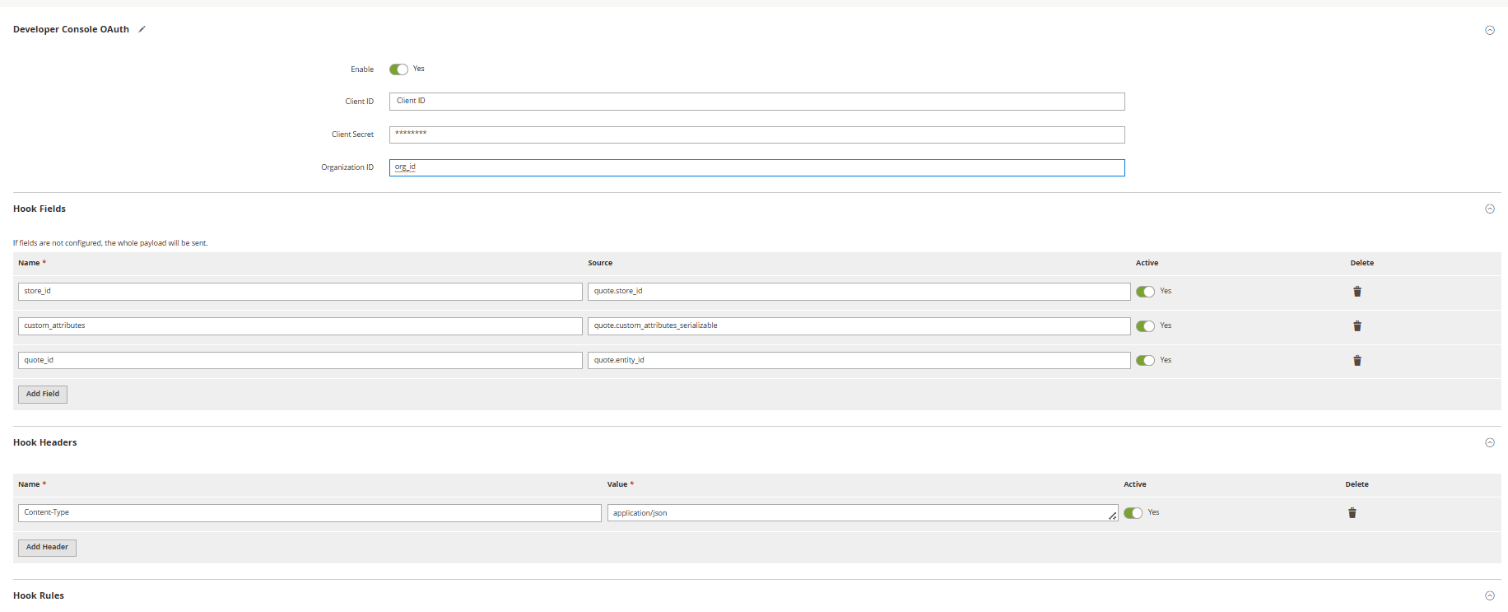
Below the primary configuration are three additional sections that allow you to customize the webhook request.
Developer Console OAuth
If your endpoint is secured, configure Adobe Developer Console OAuth credentials here. OAuth enables secure communication between Adobe Commerce and Adobe App Builder.
Hook Fields
Hook Fields determine which Commerce data is included in the webhook payload. Instead of sending the complete Commerce object, you can select only the fields your external service requires. Example:
| Name | Source |
|---|---|
| store_id | quote.store_id |
| quote_id | quote.entity_id |
Benefits include smaller request payloads, faster execution, improved performance, and reduced network traffic. This is one of the easiest places to overbuild a webhook subscription in Adobe Commerce as a Cloud Service, so treat Hook Fields as a whitelist, not a suggestion.
Hook Headers
Hook Headers allow custom HTTP headers to be included with every request. A common example is Content-Type: application/json. Headers are commonly used for authentication and request customization.
Step 4: Save and Test the Webhook
Once configuration is complete:
- Click Save.
- Navigate to System → Webhooks Logs.
- Trigger the Commerce event associated with your webhook.
- Verify that the request reaches your external service.
- Review the logs for successful execution or troubleshooting information.
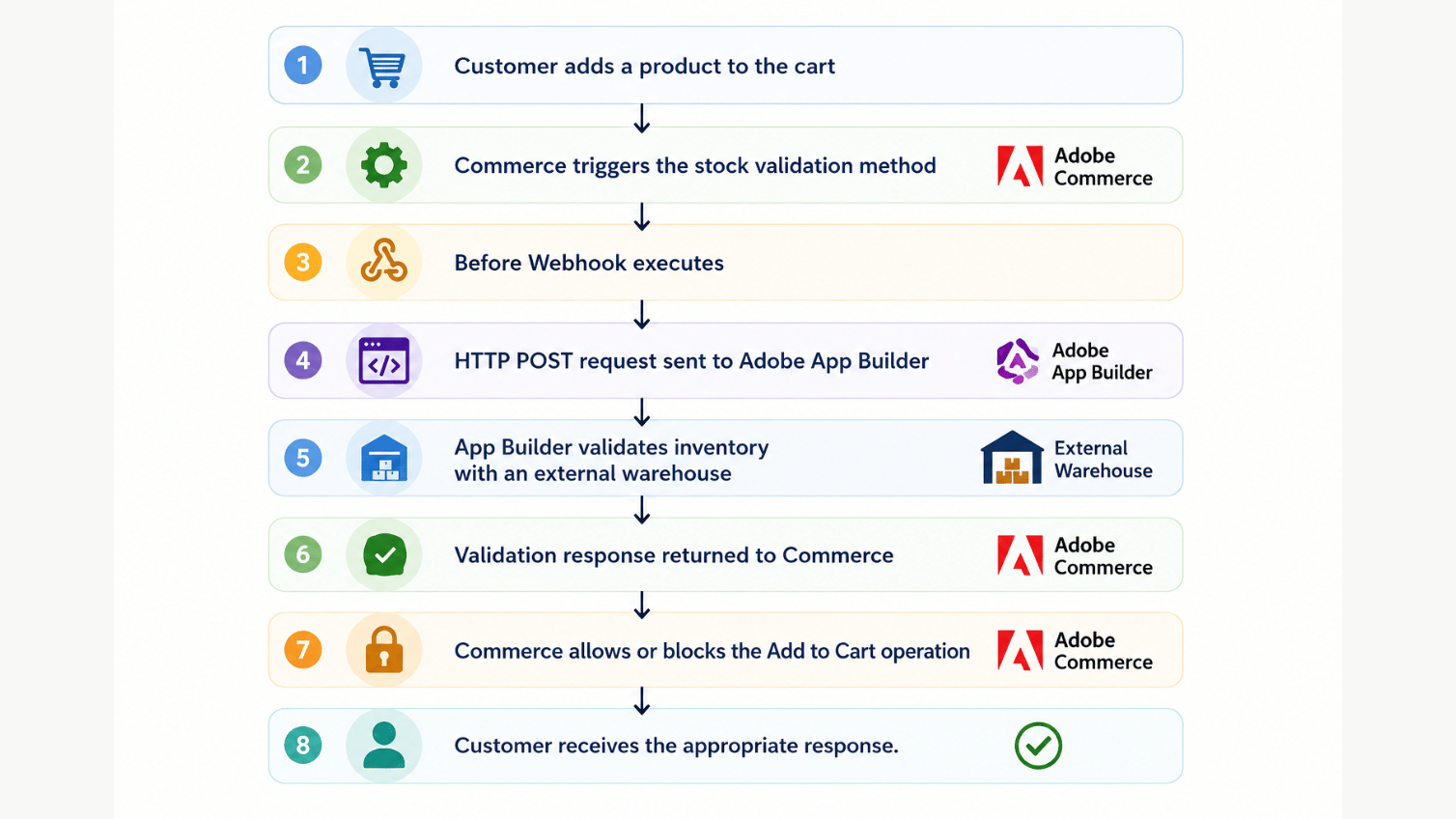
Example Workflow
The following example illustrates a stock validation process:
Ready to Build Powerful Adobe Commerce Integrations?
Connect Adobe Commerce Webhooks with App Builder, ERPs, CRMs, and third-party services to automate workflows, enable real-time data synchronization, and build scalable commerce integrations tailored to your business.
What Actually Happened Setting Up an ACCS Webhook
We ran into this exact custom fee scenario on a B2B Adobe Commerce build in 2025. The client’s finance team needed the quote total recalculated by an external pricing engine before checkout, based on account-level contract pricing that lived outside Commerce entirely. First attempt, we set the webhook to Required with a 3000ms timeout, matching what worked fine in our local App Builder tests. In production, under real cart load, the pricing engine’s response time crept past 3 seconds on maybe 1 in 20 requests, and Required meant those carts just failed at checkout. Not a great look for a live store.
We fixed it two ways: bumped Timeout to 5000ms with Soft Timeout at 2000ms so slow responses got logged as warnings instead of silent failures, and switched the Webhook Type to before on the totals collector method specifically so the fee logic ran ahead of tax calculation instead of racing it. According to Adobe’s own Commerce Webhooks Overview, synchronous webhook calls are meant for exactly this kind of scenario, where Commerce needs to compute or validate something using a third-party endpoint before writing the result back. After the timeout and sequencing fix, checkout failure on that flow dropped close to zero over the following month.
Best Practices
To build reliable webhook integrations on Adobe Commerce as a Cloud Service, consider the following recommendations:
- Secure webhook endpoints using OAuth or API keys.
- Keep response times well below the configured timeout.
- Use Optional webhooks during development and testing.
- Switch to Required only after confirming endpoint reliability.
- Send only the fields your service actually needs.
- Monitor Webhooks Logs regularly to identify failures and performance issues.
- Implement proper error handling in your external service.
- Design webhook endpoints to be idempotent whenever possible.
If you’re weighing webhooks against other extensibility options for the same ACCS project, our headless commerce development guide covers where GraphCommerce and API Mesh fit versus a webhook subscription.
Common Mistakes
These are the mistakes we see most often when a team sets up its first webhook subscription in Adobe Commerce as a Cloud Service.
Guessing the payload instead of pulling it from Webhooks List.
Every webhook method has a documented payload structure, visible in the Admin. Teams that skip this step end up writing App Builder actions that expect fields which don’t exist on that particular method, then spend hours debugging what looks like a connectivity issue.
Setting Required before the endpoint has proven itself.
Required is unforgiving. If your endpoint has any flakiness at all, Required turns that flakiness into failed checkouts and blocked carts. Run Optional in production for a week or two first, watch the logs, then flip it once you trust the numbers.
Ignoring Soft Timeout entirely.
Soft Timeout is free monitoring. It costs nothing to set and gives you an early warning in the logs before Timeout starts failing requests outright. Most teams leave it blank and only find out about latency creep after Required webhooks start blocking real orders.
Sending the full Commerce object instead of scoping Hook Fields.
We’ve seen webhook payloads bloated with cart, customer, and shipping data an App Builder action never touches. Trim Hook Fields to what the endpoint actually reads. It’s faster and easier to debug.
Forgetting to redeploy the App Builder action after a payload change.
If you adjust the webhook’s Hook Fields or switch methods, the App Builder action on the receiving end needs to match. A stale action deployed against an old payload shape is a quiet source of silent failures.
FAQ
Q: What is a webhook in Adobe Commerce as a Cloud Service?
A: It’s a Commerce Admin feature – a webhook subscription in Adobe Commerce as a Cloud Service – that lets a plugin or observer method call out to an external HTTPS endpoint, synchronously, either before or after that method runs, without writing custom core code.
Q: How do I subscribe to a webhook in Adobe Commerce ACCS?
A: Go to System → Webhooks → Webhooks Subscriptions, click Add New Webhook, pick the Commerce method, set the type, URL, and timeout fields, then save and test from Webhooks Logs.
Q: Is setting up ACCS webhooks free, or do I need extra tooling?
A: The webhook feature itself is built into Adobe Commerce as a Cloud Service at no extra cost. You will need somewhere to host the receiving endpoint – most teams use Adobe App Builder, which has its own usage-based pricing.
Q: Do I need coding experience to configure a webhook subscription?
A: Configuring the subscription in the Admin doesn’t require code. Building the App Builder action that receives and processes the request does, so you’ll want a developer for the endpoint side even if the Admin setup is point-and-click.
Q: Does subscribing to a webhook actually slow down my storefront?
A: Only the specific flow tied to that webhook, and only by roughly whatever your external endpoint’s response time is. That’s exactly why Timeout and Soft Timeout matter – they cap how much latency a slow endpoint can add.
Q: Webhooks vs Adobe I/O Events – which one should I use?
A: Webhooks are synchronous and built for when Commerce needs an answer back immediately, like a price calculation or a stock check. Adobe I/O Events are asynchronous and better suited to fire-and-forget notifications where Commerce doesn’t need to wait for a response.
Q: Why is my webhook not firing after I saved the subscription?
A: Check that Active is enabled, confirm the Webhook Method matches the exact event you’re expecting, and check Webhooks Logs for the specific error. In most cases it’s either an inactive subscription or a method name typo.
Q: Are webhooks supported on Adobe Commerce as a Cloud Service in 2026?
A: Yes. Adobe has continued expanding webhook support alongside App Builder and App Management, and it remains one of the primary out-of-process extensibility tools for ACCS merchants this year.
Conclusion
Webhooks in Adobe Commerce as a Cloud Service exist because SaaS took core customization off the table, and merchants still need Commerce to talk to inventory systems, pricing engines, and fraud checks in real time. The Admin setup is genuinely simple once you’ve done it once – the part that actually determines whether it holds up in production is the timeout and Required/Optional decisions most teams treat as an afterthought. Get those right from the start and you’ll skip the debugging session we didn’t.
Whether you’re validating inventory, calculating custom pricing, or synchronizing orders with an outside system, a webhook subscription is one of the more direct ways to extend ACCS without touching anything Adobe manages for you.
If you’re planning a broader Adobe Commerce build or migration
If you’re planning a broader Adobe Commerce build or migration and want a second set of eyes on where webhooks fit into your architecture, our team at Ethnic Infotech works on exactly this – see how we approached a similar Adobe Commerce optimization project for Bedstar, or explore our Adobe Commerce development services for build and integration support. If you’re still deciding between platforms or replatforming entirely, our ecommerce replatforming guide is a useful next read, and if you’re curious how AI tools now connect to Magento data directly, our Magento 2 MCP Connector piece is worth a look too. Reference points for the platform side of things, straight from Adobe, are in the App Management webhooks documentation.
Planning your next product, platform, or growth move?
Ethnic Infotech helps teams shape scalable software, sharper customer experiences, and content systems that support real business growth.