

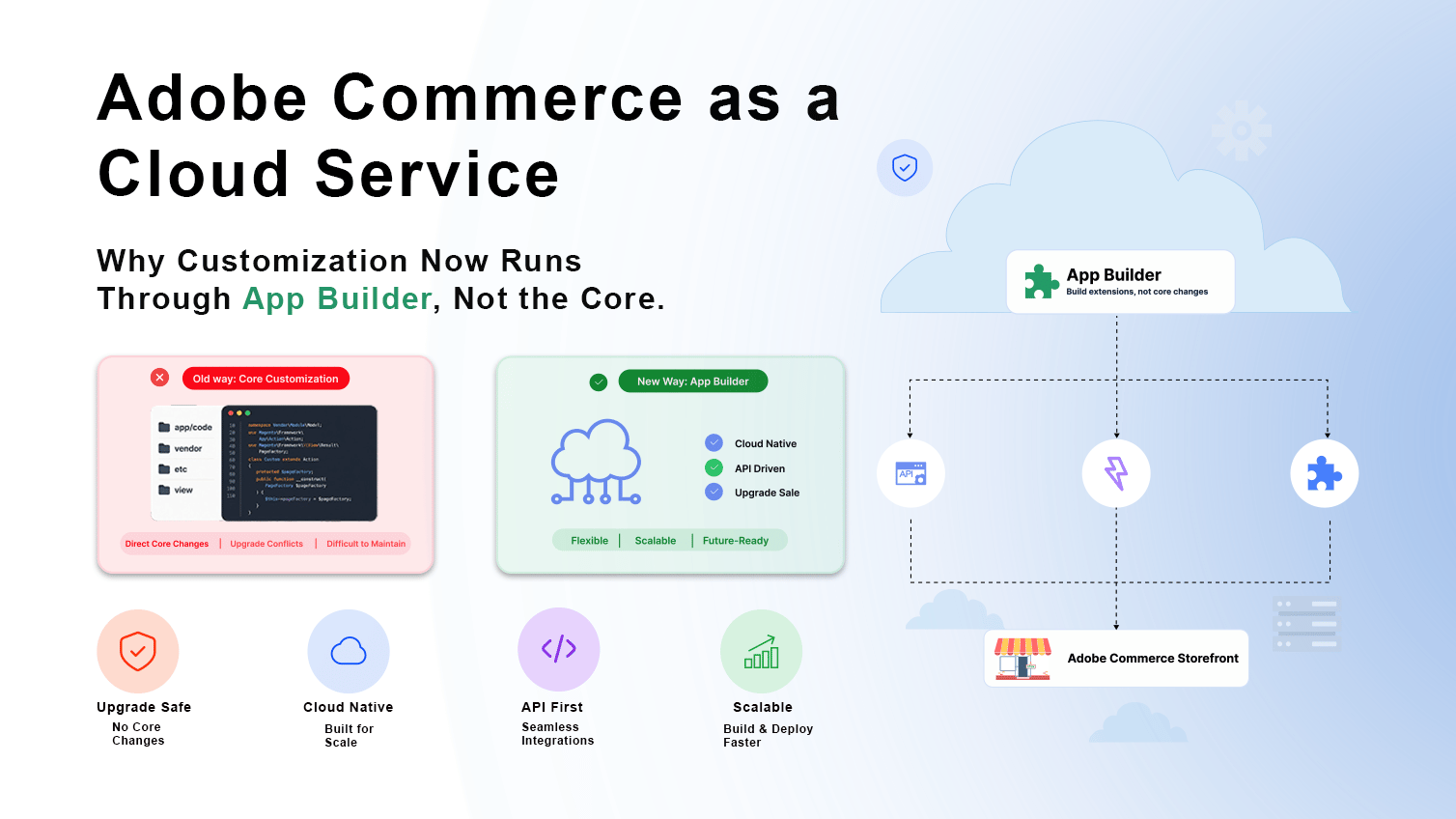
For a lot of merchants, that trade is an easy yes. No more babysitting servers, no more multi-week upgrade projects, no more 2am alerts because a traffic spike took the site down. Adobe handles it.
But there’s a question we get asked in almost every ACCS conversation, usually somewhere around the second call: “If we don’t have core code access anymore, how do we actually customize anything?”
That question is the real story of ACCS, and it’s the one most explainer content skips past. The honest answer is: you customize through Adobe Developer App Builder and I/O Events Adobe’s serverless extensibility layer that sits beside ACCS rather than inside it. If your team, or your agency, doesn’t have real App Builder depth, “going to ACCS” quietly becomes “losing the ability to build anything custom.” If they do, ACCS becomes one of the more extensible, future-proof commerce platforms available today.
This is where we focus and it’s why we’re writing this less as a general primer and more as a practical brief for teams evaluating, migrating to, or already running on ACCS.
What ACCS Actually Is (and Isn’t)
ACCS is a managed SaaS deployment of Adobe Commerce. Adobe runs the application layer; you don’t get shell access, you don’t deploy custom modules into app/code, and you don’t touch the core codebase directly. Compare that to Adobe Commerce Cloud (PaaS), where you still manage your own code deployments and infrastructure configuration within Adobe’s cloud, or Magento Open Source, where you control and are responsible for everything.
The trade-off is explicit: you give up direct backend access in exchange for Adobe owning operational risk. That’s a good deal if your customization strategy doesn’t depend on backend access in the first place which is exactly what App Builder is designed to solve.
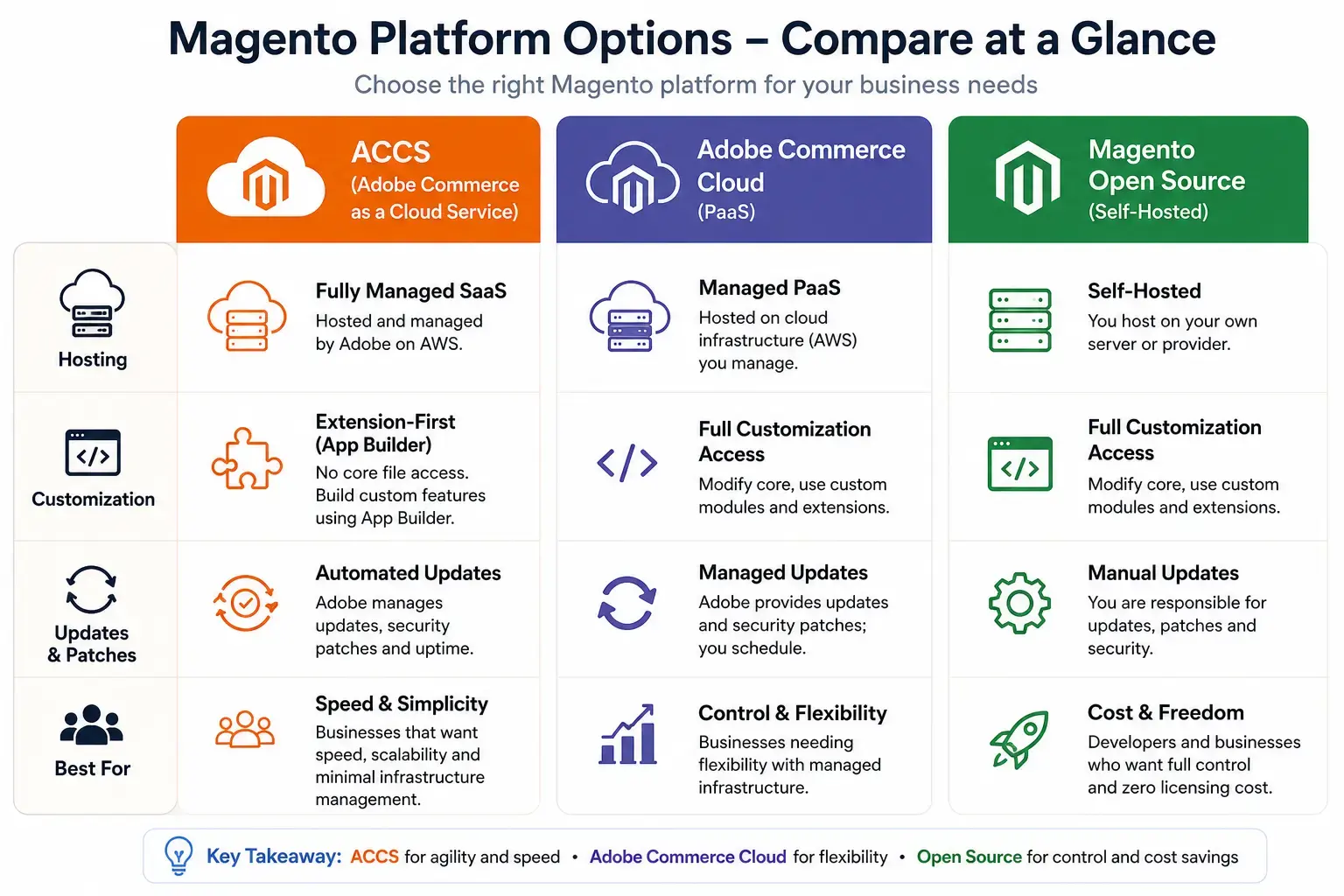
| Capability | ACCS (SaaS) | Adobe Commerce Cloud (PaaS) | Magento Open Source |
|---|---|---|---|
| Hosting & infrastructure | Adobe-managed | Shared responsibility | Self-managed |
| Core code access | None | Full | Full |
| Customization model | App Builder, APIs, events | Core code + extensions | Core code + extensions |
| Updates | Automatic | Planned/manual | Manual |
| Scaling | Automatic | Configurable | Depends on hosting |
| Technical overhead | Low | Medium | High |
Why App Builder Is the Real Story on ACCS
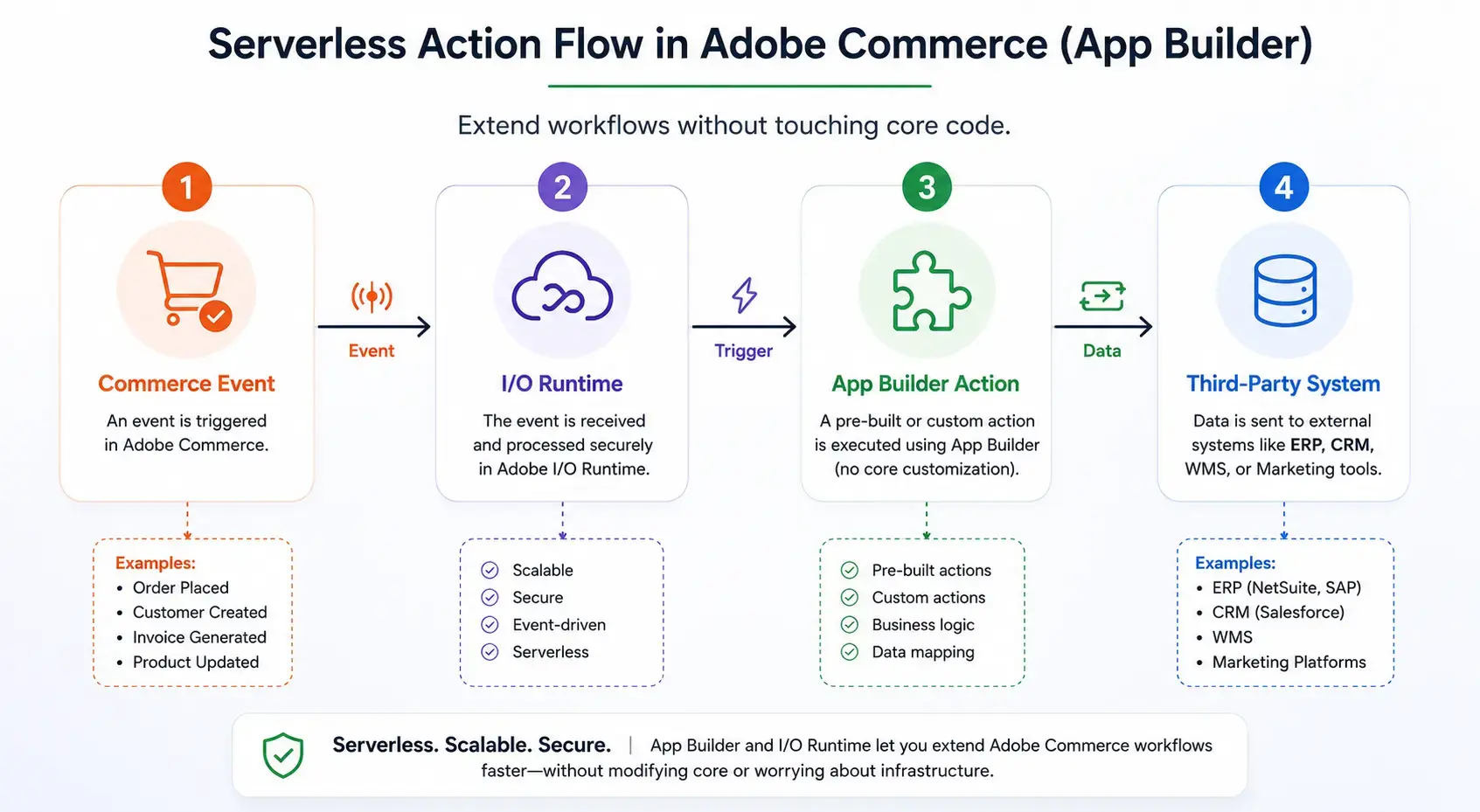
App Builder is Adobe’s serverless, event-driven framework for building extensions that run alongside ACCS rather than inside it. Instead of writing a Magento module that hooks into core observers and plugins, you write serverless actions (built on Adobe I/O Runtime, which is based on Apache OpenWhisk) that:
- React to commerce events via I/O Events order placed, customer created, product updated, inventory changed, and dozens of other triggers
- Call Commerce APIs (REST/GraphQL) to read and write data
- Expose your own APIs that other systems ERPs, CRMs, marketplaces, mobile apps can call
- Run on Adobe’s infrastructure, with no servers for you to provision, patch, or scale
This is the part most ACCS comparison content treats as a footnote. We treat it as the main technical decision in any ACCS project, because the quality of your App Builder architecture determines whether ACCS feels liberating or limiting six months after go-live.
I/O Events: The Nervous System of a Headless ACCS Build
I/O Events is what makes App Builder reactive instead of polling-based. Commerce emits events com.adobe.commerce.observer.sales_order_save_commit_after, catalog_product_save_commit_after, customer events, B2B company/account events, and more and your App Builder actions subscribe to the ones relevant to your integration.
A few patterns we build on this regularly:
ERP sync
ERP sync: order-placed event triggers an action that pushes the order to SAP, NetSuite, or a custom ERP, then writes back fulfillment status as it changes without a single cron job polling for “new orders since last check.”
Inventory and pricing sync
Inventory and pricing sync: external system updates stock or price → I/O Event fires (or a webhook triggers your custom event) → App Builder action calls the Commerce GraphQL/REST API to update ACCS in near real time.
Marketing and CRM triggers
Marketing and CRM triggers: customer registration or cart abandonment events feeding directly into Marketo, Braze, or a custom loyalty engine, instead of relying on batch exports.
Retry and dead-letter handling
Retry and dead-letter handling: I/O Events supports configurable retry policies, and a properly designed action should be idempotent and log failures to a dead-letter queue rather than silently dropping events something we build into every integration by default, because event delivery failures during a flash sale are exactly when a merchant notices.
If your team can’t design clean event-driven flows with idempotency, retry logic, and observability built in App Builder becomes a fragile integration layer instead of a robust one. That’s the gap between “ACCS is restrictive” and “ACCS is extensible,” and it’s almost entirely a question of execution, not platform limitation.
Where This Plays Out: Composable and Headless Architecture
ACCS is built to be the commerce engine inside a composable stack, not the whole stack. That’s also where our background in headless and PWA development connects directly to App Builder work the two are usually the same project.
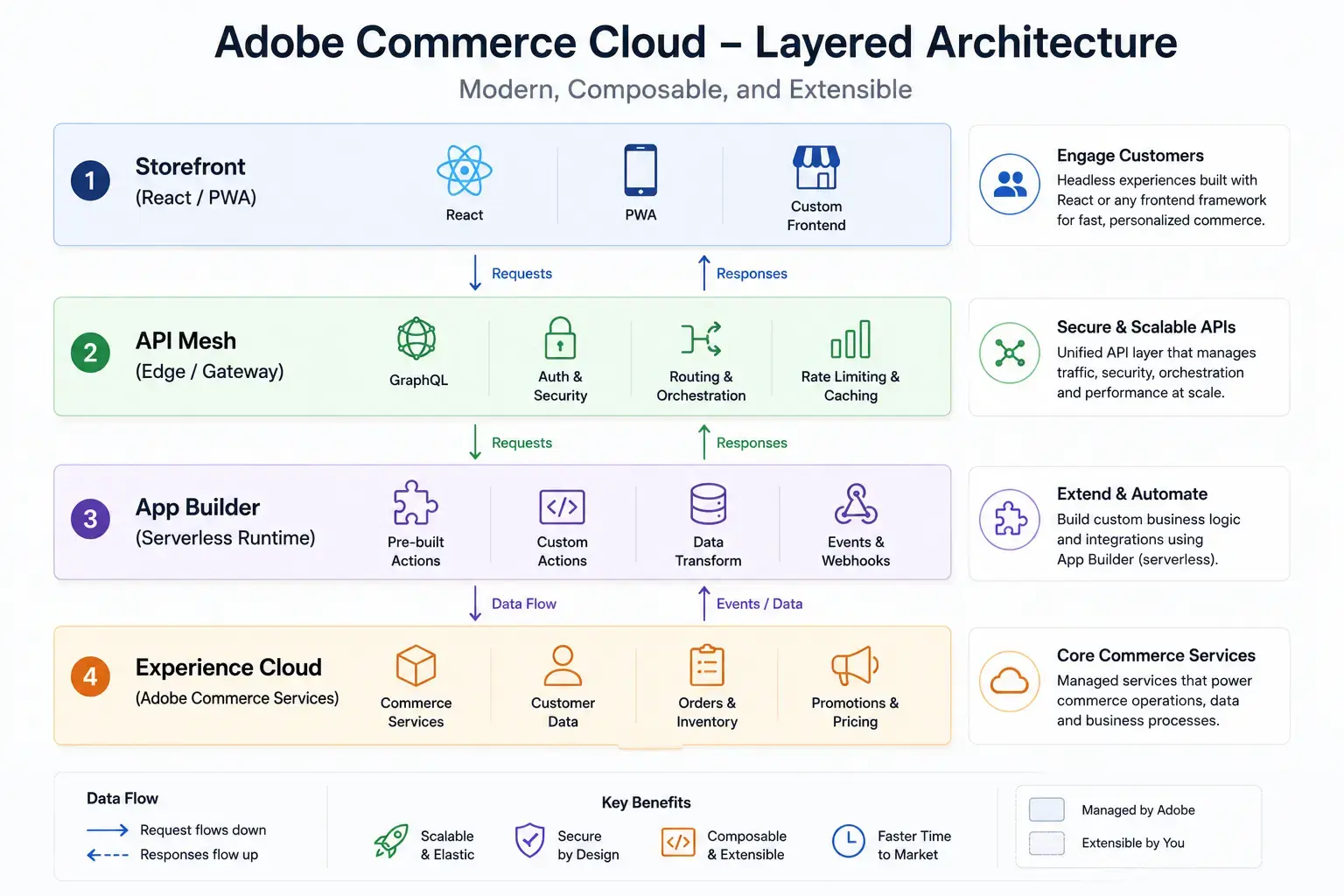
A typical composable build we’d architect looks like:
- Storefront:React/PWA Studio, or a custom headless frontend, decoupled from the backend
- API layer: Commerce GraphQL plus API Mesh for Adobe Developer App Builder, which lets you combine Commerce’s GraphQL schema with third-party APIs (PIM, search, reviews, ERP) into a single unified endpoint for the frontend to query
- Extensibility layer: App Builder actions handling business logic, integrations, and event reactions
- Experience layer: optional Adobe Experience Cloud integration (AEM, Target, Analytics) for content and personalization
API Mesh in particular is underused in most ACCS conversations, and it’s one of the more valuable pieces for merchants trying to avoid frontend teams making a dozen separate API calls to a dozen separate systems. It also keeps backend complexity off the storefront, which matters a lot for performance on Core Web Vitals something UK and EU clients in particular tend to be strict about, given the SEO and conversion stakes.
Need Expert Help with Adobe Commerce Cloud?
Whether you’re implementing Adobe Commerce as a Cloud Service, developing App Builder extensions, or modernizing your ecommerce platform, our certified experts build secure, scalable, and future-ready solutions that grow with your business.
Honest Trade-Offs Worth Naming
We’d rather a prospective client hear this from us upfront than discover it three months into a migration:
Extension compatibility is the biggest migration cost.
Extension compatibility is the biggest migration cost. Most Magento Open Source and Adobe Commerce Cloud stores carry a long tail of third-party extensions or custom modules that assume core code access. None of that ports directly to ACCS. Each one needs to be re-architected as an App Builder action, replaced with an API-based SaaS alternative, or sometimes deliberately dropped because it was solving a problem the new architecture doesn’t have anymore. This audit work is where migration timelines actually live or die, and it’s where we spend the most time before quoting a project.
Some customizations genuinely don’t fit App Builder’s model.
Some customizations genuinely don’t fit App Builder’s model. Deep checkout logic changes, certain tax/pricing edge cases, and anything that fundamentally needs to intercept core request flow synchronously can be harder to replicate purely through events and APIs. Knowing which customizations fall into this category and flagging it during discovery rather than during development is part of doing this work honestly.
ACCS isn’t the cheapest option for a simple store.
ACCS isn’t the cheapest option for a simple store. If a merchant’s customization needs are minimal and budget is the primary constraint, Magento Open Source or even staying on Adobe Commerce Cloud may be the better call. We’ll say that plainly in a discovery call rather than push ACCS as a default recommendation.
Adobe ecosystem alignment helps.
Adobe ecosystem alignment helps. Third-party tools that already have App Builder integrations or webhook support migrate cleanly. Tools that assume direct database or filesystem access don’t, and need a different integration pattern entirely.
Who Tends to Get the Most Value from ACCS + App Builder
Patterns we see across the clients where this combination performs best:
- Multi-region retailers: (a recurring profile for our UK/EU/UAE client base) who need region-specific tax, payment, and compliance logic UK GDPR, EU VAT/OSS rules, UAE VAT handled through API-driven configuration rather than core code forks per region
- B2B and B2B2C operations: with account-based pricing, approval workflows, and ERP-dependent order flows that map naturally onto event-driven sync
- High-traffic seasonal sellers: (fashion, FMCG, marketplaces) who want elastic scaling without owning that infrastructure problem
- Brands already committed to a composable stack: headless frontend, separate PIM, separate search where ACCS is one well-defined service among several, not a monolith
Conversely, a heavily customized legacy Magento store with years of accumulated core hacks and no appetite to re-architect that logic is usually a harder, slower, more expensive ACCS candidate and we’ll tell a client that directly rather than oversell the migration.
What a Properly Scoped ACCS Migration Actually Reviews
Before quoting any ACCS project, we walk through:
- Extension and customization audit: what exists today, what maps to an App Builder action, what maps to a SaaS replacement, what gets retired
- Integration inventory: ERP, CRM, PIM, marketplaces, payment gateways, shipping providers, and which ones already support API/webhook patterns
- Event mapping: which business processes need to react to commerce events, and what the retry/idempotency/monitoring strategy looks like for each
- Frontend strategy: headless/PWA build vs. existing theme adaptation, and where API Mesh consolidates the data layer
- Region-specific compliance: payment methods, tax handling, data residency, and consent requirements for the markets the store sells into
- Data migration plan: products, customers, order history, and how cutover is sequenced to minimize downtime
This is the same discipline we apply across our Adobe Commerce work generally, just pointed specifically at the constraints ACCS introduces.
Common Mistakes We See in ACCS Migrations (Including Ones We Didn’t Build)
We occasionally get called in to fix or extend an ACCS implementation someone else built. A few failure patterns show up often enough to be worth naming:
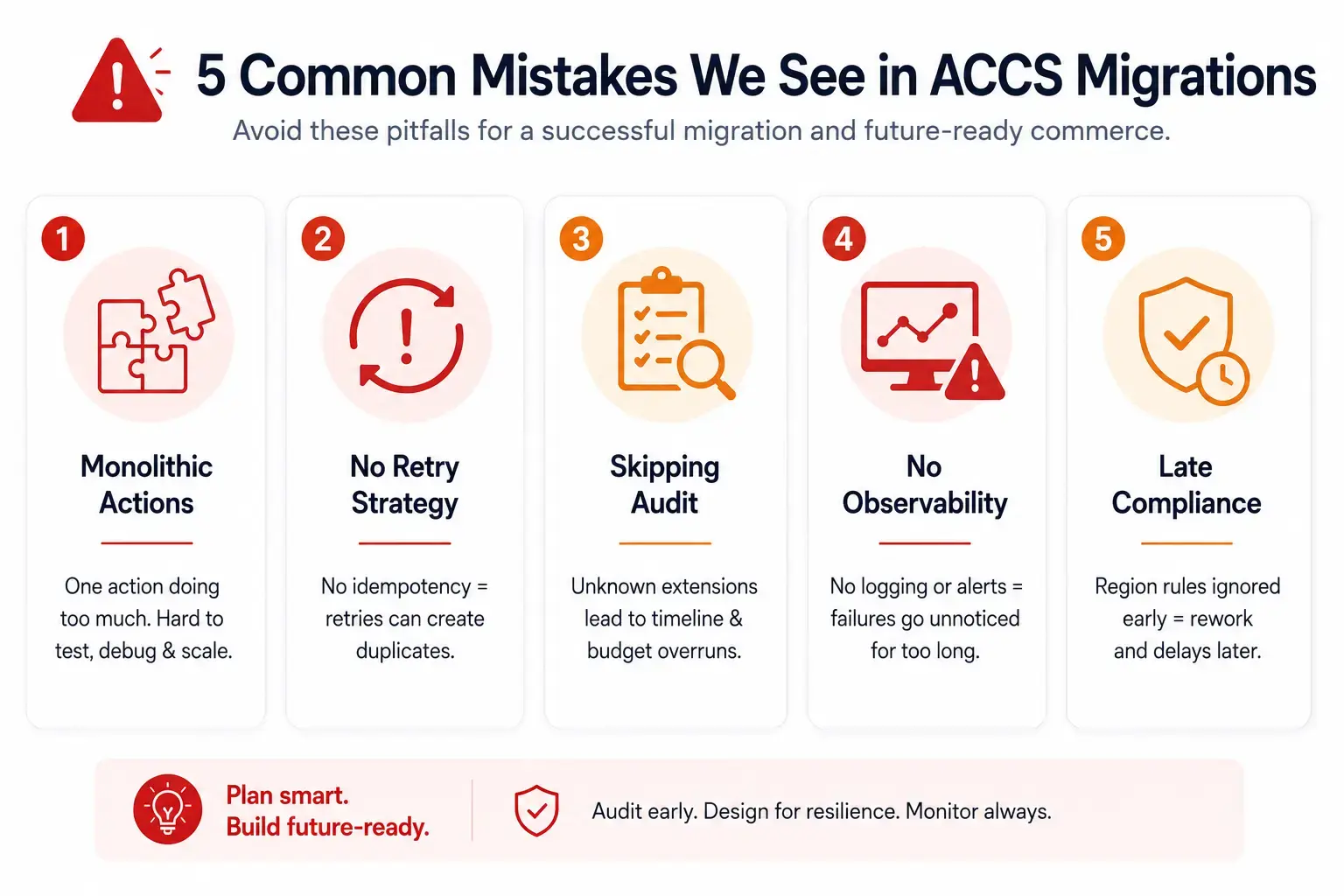
Treating App Builder actions as a dumping ground.
Treating App Builder actions as a dumping ground. A single monolithic action that handles five unrelated responsibilities is hard to test, hard to debug, and hard to scale independently. We design actions around single responsibilities one action per business capability even when it means slightly more orchestration logic up front.
No retry strategy beyond Adobe’s defaults.
No retry strategy beyond Adobe’s defaults. I/O Events retries failed deliveries automatically, but the default behavior isn’t a substitute for application-level idempotency. If an action isn’t written to safely process the same event twice, a retry can create duplicate orders in an ERP or double-count inventory adjustments. We treat idempotency keys as a non-negotiable part of any event handler, not an optimization to add later.
Underestimating the extension audit.
Underestimating the extension audit. Teams sometimes scope ACCS migrations as if it’s a lift-and-shift, then discover mid-project that a third of their “must-keep” extensions have no clean App Builder equivalent. This is the single biggest source of timeline and budget overruns we see industry-wide, and it’s exactly why the audit step comes before the quote, not after the kickoff.
Skipping observability.
Skipping observability. Serverless and event-driven doesn’t mean invisible. Without logging, alerting, and a dead-letter queue strategy, a silently failing integration can run for weeks before anyone notices orders aren’t syncing to the ERP. We build monitoring into the architecture from day one rather than treating it as a post-launch nice-to-have.
Ignoring region-specific requirements until late.
Ignoring region-specific requirements until late. For merchants selling into the UK, EU, and UAE simultaneously, payment method availability, tax calculation, and data handling rules differ enough that bolting them on after the core build is finished usually means rework. We map these requirements during discovery, alongside the technical integration inventory.
Frequently Asked Questions
Can we keep our existing Magento extensions on ACCS?
Some can be adapted if they expose clean API hooks; most that rely on direct core code access cannot run as-is and need to be rebuilt as App Builder actions or replaced with an API-based service. This is determined extension-by-extension during the audit, not assumed either way.
Do we need a headless frontend to use ACCS?
No Adobe still supports a more traditional storefront approach, but ACCS’s architecture is optimized for headless/composable setups, and most of the platform’s real advantages (edge performance, frontend flexibility, faster iteration) show up most clearly in a headless build.
How long does a typical ACCS migration take?
It depends almost entirely on the extension and integration audit findings, not on data volume. A store with few customizations and clean API-ready integrations can move in a matter of weeks; a heavily customized legacy store with deep ERP and marketplace dependencies is a multi-month re-architecture project.
Is App Builder development more expensive than traditional Magento module development?
Not inherently it’s a different skill set (serverless functions, event design, API-first thinking) rather than a more expensive one. Costs rise when a team without App Builder experience has to learn the model on a client’s timeline, which is part of why this is a specialization rather than a generic Magento skill.
Can ACCS integrate with our existing ERP and CRM?
Yes, through API Mesh and App Builder actions reacting to I/O Events. The integration pattern changes event-driven rather than direct database access but the end result is typically more real-time than older polling-based integrations.
Where We Fit
We’re an Adobe Commerce development team with App Builder, I/O Events, API Mesh, and headless/PWA work as core parts of our practice not a bolt-on we picked up after ACCS launched. We work across UK, EU, and UAE merchants, which means region-specific payment methods, BNPL/FCA considerations, UK GDPR, and UAE VAT come up routinely, not as edge cases.
If you’re evaluating a move to ACCS, sitting on an ACCS store that feels more locked-down than it should, or scoping a composable/headless rebuild that needs a serverless integration layer done properly that’s the conversation we’re best placed to have.
Get in touch and tell us where your store is today.
Whether that’s a legacy Magento instance with a decade of customizations, an existing ACCS deployment that needs a better integration architecture, or a clean-slate composable build, we’ll give you a straight read on scope, risk, and what App Builder can and can’t realistically do for your use case before any commitment is made.
Planning your next product, platform, or growth move?
Ethnic Infotech helps teams shape scalable software, sharper customer experiences, and content systems that support real business growth.
Comments (1)
ExoWatts
Great content! Keep up the good work!